
Monthly IPTV Subscription: A UK Guide Before You Buy
How monthly IPTV plans work, how they compare with 3, 6 and 12 month plans, which devices, apps and internet speeds you need, and the checks to make before you pay.

Published 10 min read
In this article
- What is a monthly IPTV subscription?
- How monthly IPTV subscriptions work
- Monthly IPTV vs 3, 6 and 12 month plans
- Monthly IPTV pricing: what affects the cost
- What devices support monthly IPTV?
- IPTV apps and players
- M3U and Xtream Codes: how you log in
- EPG: the TV guide
- Internet speed requirements
- How to choose a monthly IPTV provider
- What to check before subscribing
- Cancellation and renewal
- Monthly IPTV vs our plans at UKProviderNow
- Monthly IPTV FAQs
- Is a monthly IPTV subscription worth it?
- Can I cancel a monthly IPTV subscription at any time?
- Do I need a VPN for IPTV?
- Can I use one monthly subscription on two TVs?
- Will my login change when I renew?
- Why does my IPTV buffer in the evenings?
- What is the difference between monthly IPTV UK services and international ones?
A monthly IPTV subscription lets you pay for one month of live TV, films and series at a time, with no long commitment. It is the most flexible way to buy IPTV, and also the one that costs most over a year. This guide explains how monthly plans really work, how they compare with 3, 6 and 12 month plans, which devices and apps you need, and what to check before you hand over any money.
We wrote it from the questions our customers ask us every week, and from setting up IPTV on Firesticks, Smart TVs and Android boxes across the UK.
What is a monthly IPTV subscription?
IPTV (Internet Protocol Television) delivers TV channels over your broadband instead of a satellite dish or aerial. A provider streams the channels from its servers, and an app on your TV or streaming stick plays them.
A monthly plan is simply the shortest common billing period. You pay once and get access for roughly 30 days. When the month ends, the service stops unless you renew. Some providers sell it as a "1 month IPTV subscription", others as a "monthly IPTV plan". They mean the same thing.
What you get inside the subscription is usually identical whatever the length: the same channels, the same on demand library and the same picture quality. The only differences are how long it lasts and how much you pay per month.
How monthly IPTV subscriptions work
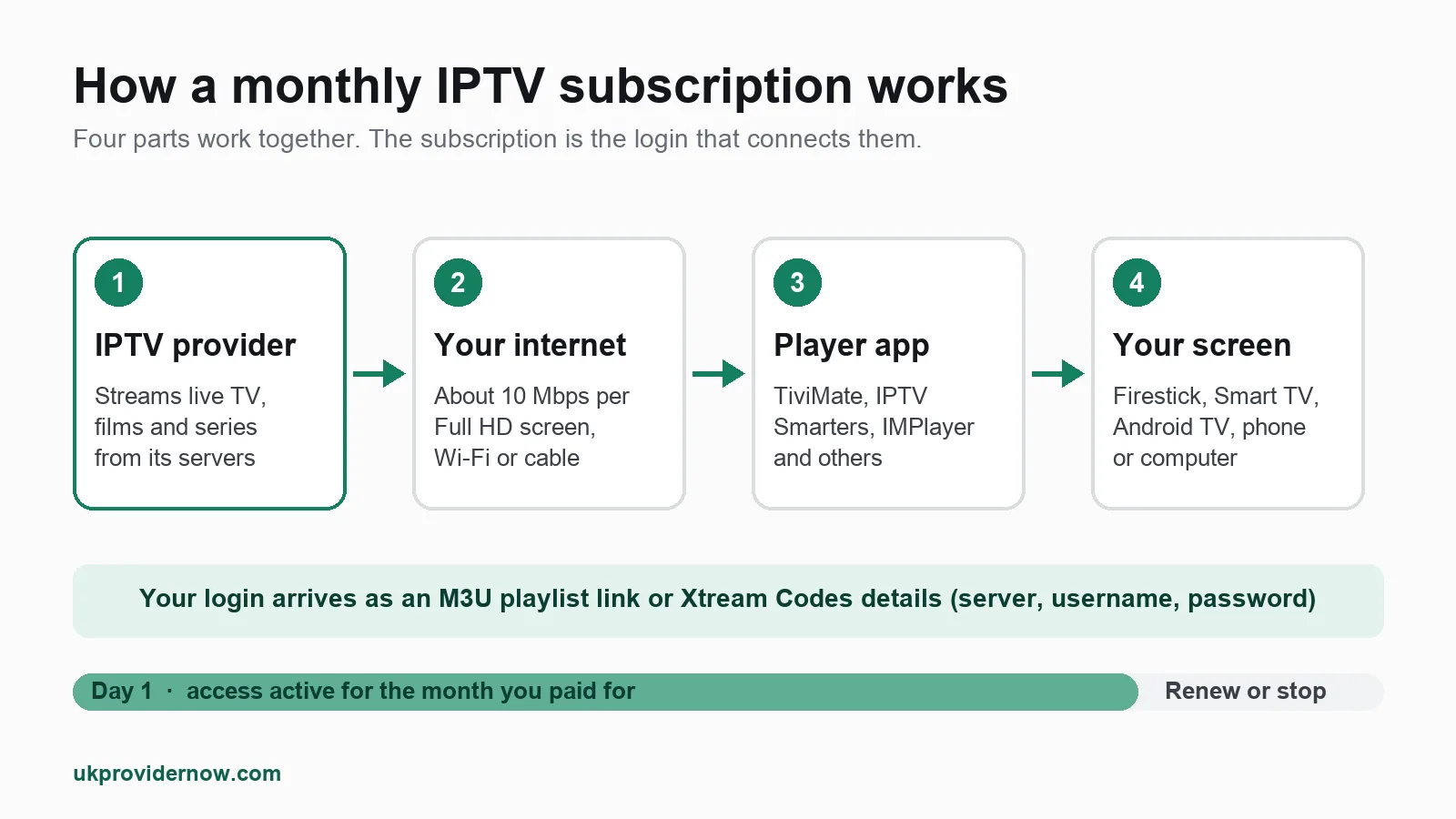
Every IPTV setup has the same four parts:
- The provider runs the servers that stream live channels, films and series.
- Your internet connection carries the stream into your home.
- A player app, such as TiviMate or IPTV Smarters, plays it.
- Your screen: a Firestick, Smart TV, Android TV box, phone or computer.
When you subscribe, the provider sends you login details. You type them into the player app once, and the app loads the channel list and TV guide. From then on it works like normal TV: pick a channel and watch.
On a monthly plan, your login has an expiry date about a month after it starts. You can check exactly when yours ends with our free IPTV expiry date checker, which reads it straight from the provider's server.
Monthly IPTV vs 3, 6 and 12 month plans
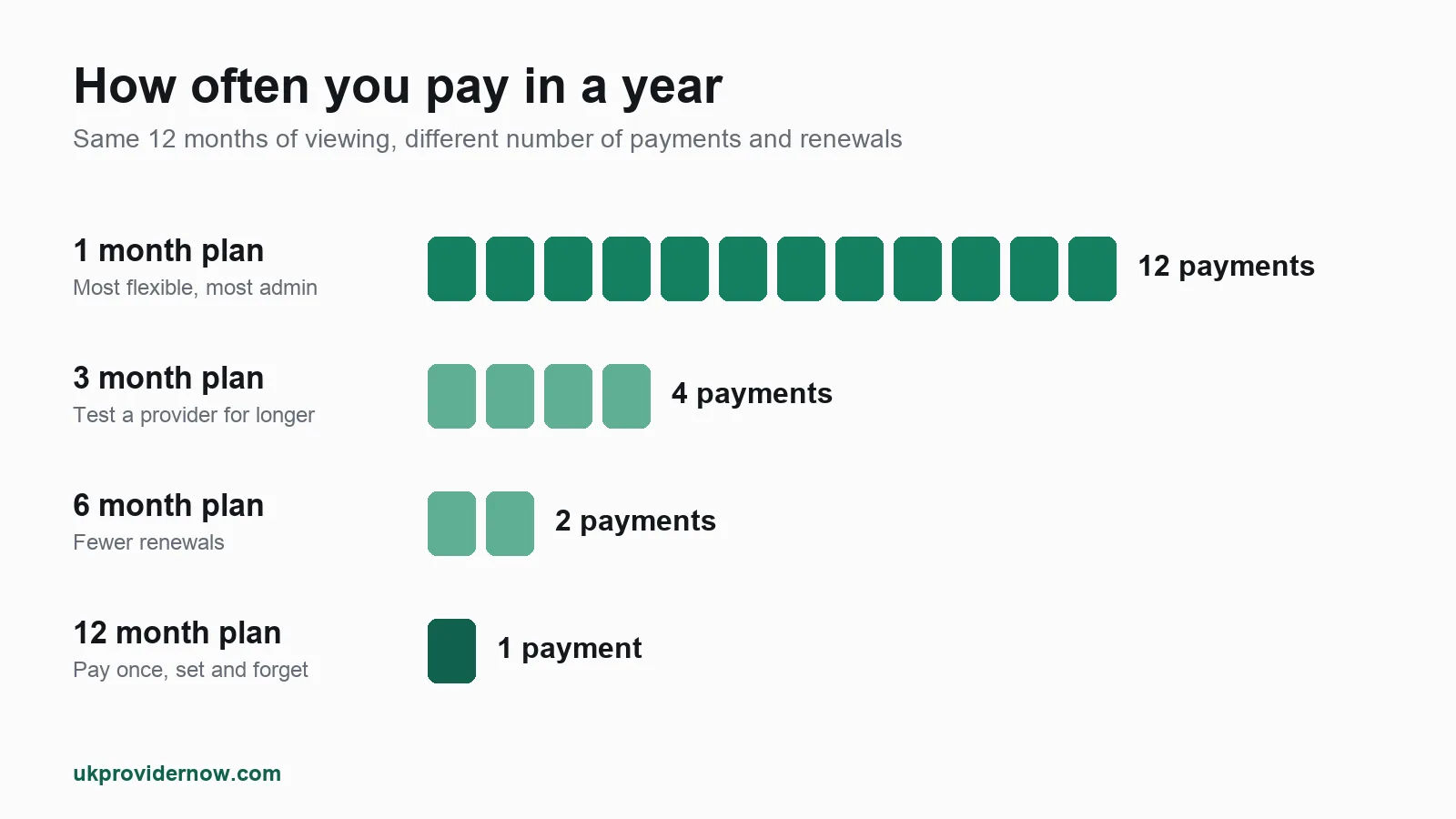
The real choice is between flexibility and cost.
| Plan length | Payments per year | Best for |
|---|---|---|
| 1 month | 12 | Trying a provider, short stays, a single tournament |
| 3 months | 4 | Testing a provider properly before committing |
| 6 months | 2 | Regular viewers who want fewer renewals |
| 12 months | 1 | Settled households who want the lowest cost per month |
Choose monthly if you are new to IPTV, you only want it for a few weeks, or you are not yet sure the service works well on your connection.
Choose a longer plan if you have already tested the provider and you watch every week. You pay less per month, you renew far less often, and there is no risk of the service stopping in the middle of a match because a renewal slipped your mind.
A middle path many people miss: test first, then buy longer. A free trial or a money back guarantee gives you the same "try before you commit" safety as a monthly plan, without paying monthly prices for the rest of the year.
Monthly IPTV pricing: what affects the cost
Monthly plans always cost more per month than longer plans from the same provider. That is the price of flexibility. Beyond the plan length, a few things change what you pay:
- Number of connections. One connection means one screen at a time. Watching on the living room TV and a bedroom Firestick at once needs two. Most providers charge for each extra connection.
- Extras. Some plans bundle adult channels, extra sports or catch up; others charge for them separately.
- Payment method. A few providers add a fee for certain payment types.
Be wary of a "cheap monthly IPTV subscription" that is far below everyone else's price. Very low prices usually mean overloaded servers, which show up as buffering at exactly the times you want to watch: Saturday afternoons and weekday evenings. It is better to judge a provider on a trial than on its headline price.
For our own current prices, see the plans and pricing page. Prices are only shown there, so they are always up to date.
What devices support monthly IPTV?
Almost anything with a screen and an internet connection can play IPTV. Your plan length makes no difference to which devices work. Our IPTV devices guide covers each one in detail; here is the short version.
Firestick
The Amazon Fire TV Stick is the most popular IPTV device in the UK: cheap, small and quick to set up. You install a player app, then log in. Our help guide on setting up IPTV on a Firestick walks through it step by step, and the Firestick IPTV setup checker tells you whether your model is up to the job.
Smart TV
Samsung and LG Smart TVs can run IPTV with apps from their own app stores, but the choice of apps is smaller than on Android. See IPTV on Samsung and LG Smart TVs, or check your model with the Smart TV IPTV checker.
Android TV
Sony, Philips, TCL and many other TVs run Android TV, as do boxes such as the Nvidia Shield. Android has the widest choice of IPTV apps and is our first recommendation for the best experience.
Google TV
Google TV is the newer version of Android TV, found on the Chromecast with Google TV and many recent TVs. Setup is the same as Android TV: follow our Android TV and Google TV setup guide.
IPTV apps and players
The subscription gives you the channels; the player app decides how they look and feel. Most apps are free or charge a small one off fee, separate from your subscription.
- TiviMate: the favourite on Firestick and Android TV, with a TV guide that looks like a cable box.
- IPTV Smarters Pro: works on almost every platform, including iPhone and iPad.
- IMPlayer: a clean, modern app with catch up and timeshift.
Our IPTV apps guide compares the rest. If you are not sure which apps run on your device, the player compatibility checker will tell you in a few seconds.
M3U and Xtream Codes: how you log in
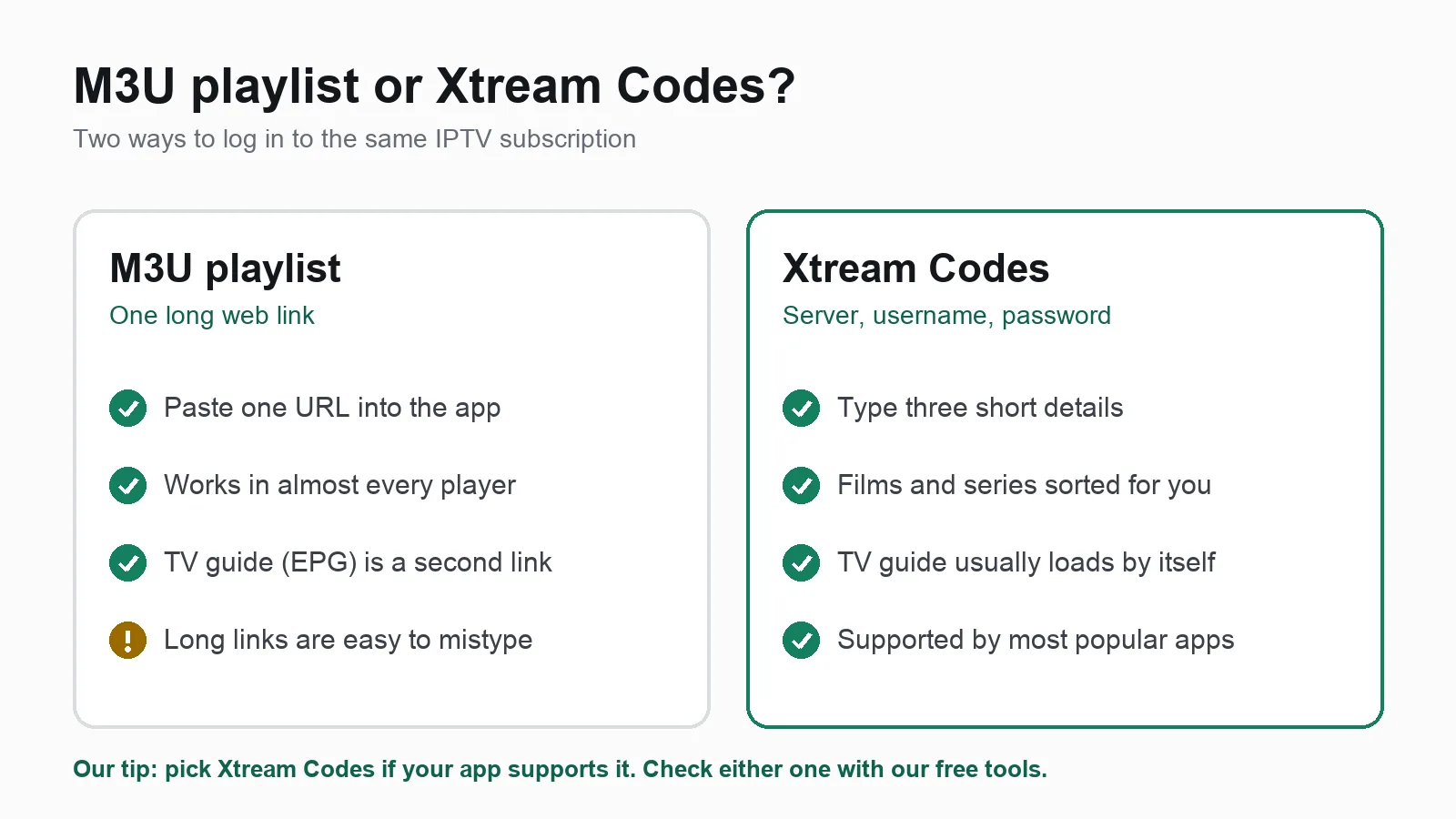
Your provider will send your login in one or both of these formats:
- M3U playlist: a single long web link containing the whole channel list. It works in nearly every player, but the TV guide usually needs a second link, and one wrong character breaks it.
- Xtream Codes: three short details: a server address, a username and a password. Apps that support it sort films and series into neat menus and usually load the TV guide automatically.
If your app supports Xtream Codes, use it. If something will not load, test your details with our free M3U validator or Xtream Codes checker. They show whether the problem is your login or your app.
EPG: the TV guide
The EPG (Electronic Programme Guide) is the on screen listings that show what is on now and next. It comes from a separate data feed, so a channel can play perfectly while its guide is empty.
If your guide is blank or shows the wrong times, the fix is usually a refresh in the app or the correct EPG link from your provider. Our help article on fixing an empty or wrong TV guide covers the common causes, and the EPG validator checks whether the guide feed itself is working.
Internet speed requirements
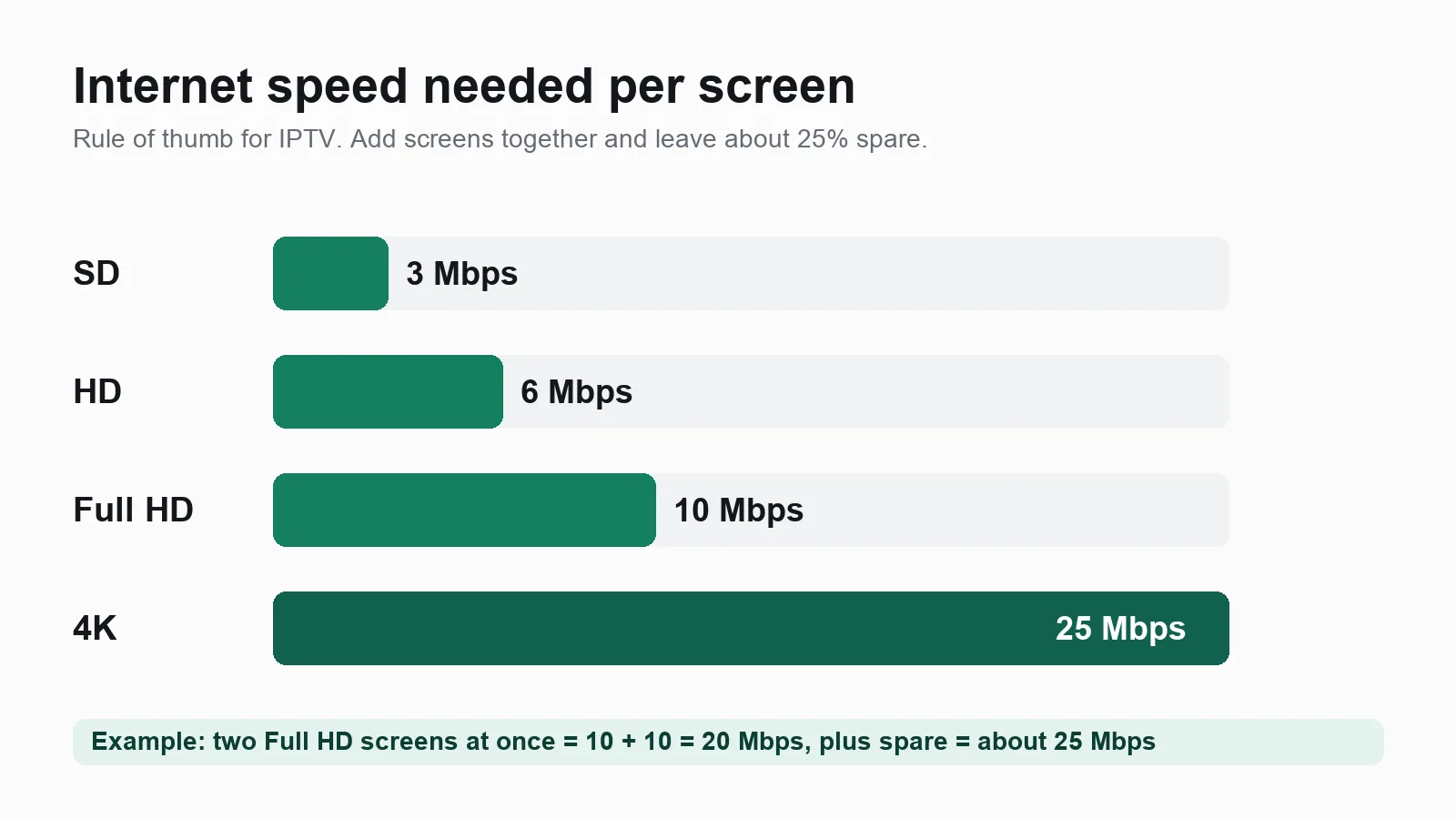
IPTV needs a steady connection more than a fast one. As a rule of thumb, allow per screen:
- SD: about 3 Mbps
- HD: about 6 Mbps
- Full HD: about 10 Mbps
- 4K: about 25 Mbps
Add the figures together for every screen watching at the same time, then leave about a quarter spare for phones and everything else on your Wi-Fi. These figures are close to Netflix's own speed recommendations, because streaming video needs roughly the same bandwidth whoever sends it.
Run our IPTV speed test at the time of day you usually watch, not first thing in the morning, because evening congestion is what causes most buffering. If you have a data cap, the data usage calculator shows how much a month of viewing will use. And if a Firestick struggles on Wi-Fi, a cheap Ethernet adapter often fixes it outright.
How to choose a monthly IPTV provider
Searching for the "best monthly IPTV subscription" turns up hundreds of sellers with near identical websites. These are the things that actually separate them:
- Stability at peak times. Any service works at 10am on a Tuesday. Test during a Saturday 3pm kick off or a weekday evening.
- A real way to try it. A free trial, or a money back guarantee with clear terms, tells you the provider expects you to stay.
- Support you can reach. You want a person who can help you set up your exact device, not a ticket that disappears.
- A UK focus. If you mainly watch UK channels, a provider built for the UK will have better coverage and a correctly timed TV guide.
- Clear terms. The connection limit, renewal rules and refund policy should be written down before you pay, not explained afterwards.
What to check before subscribing
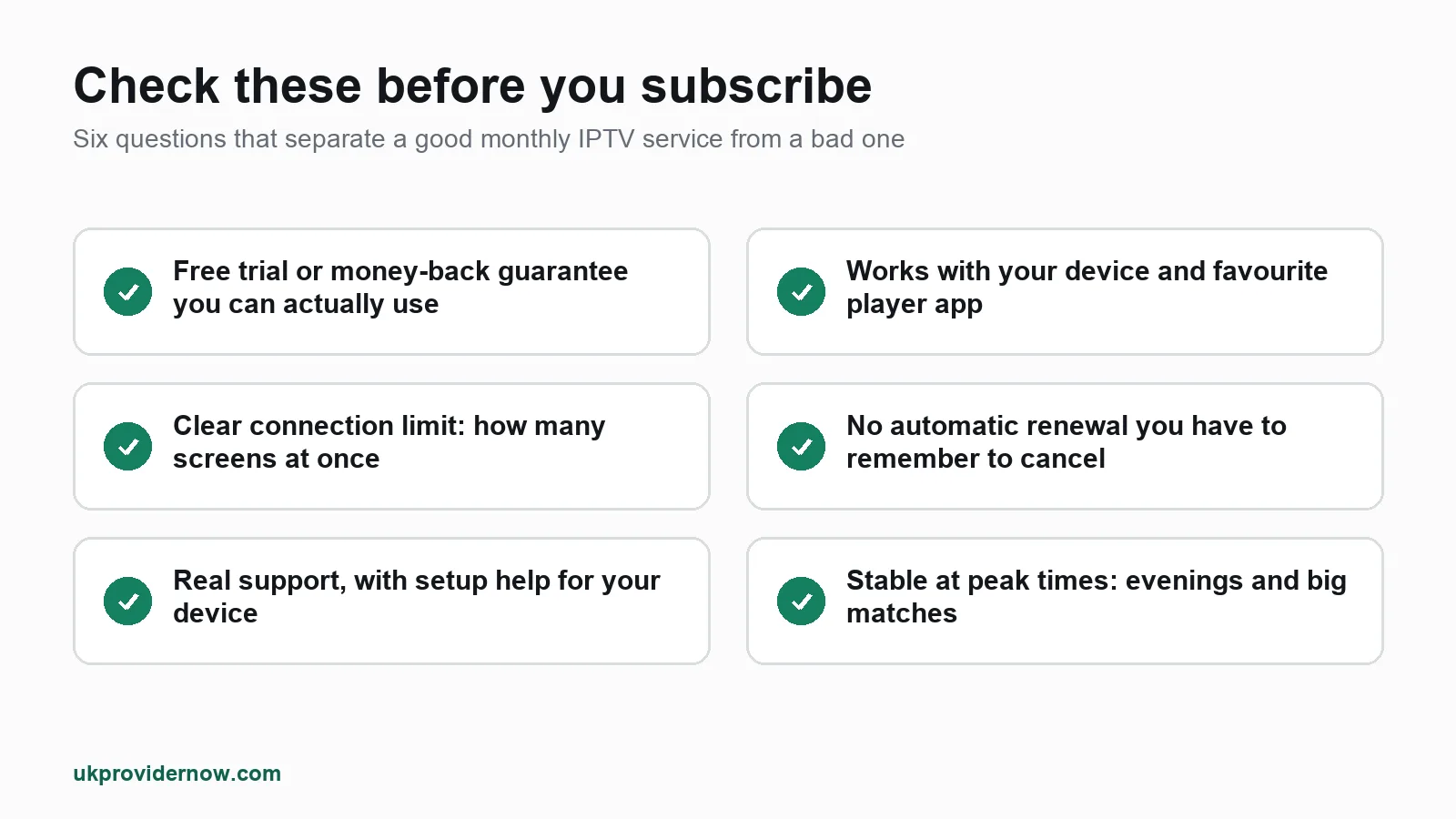
Before you pay for any IPTV subscription, monthly or not, run through this list:
- Is there a free trial or money back guarantee, and are its terms written down?
- Does it work on your device and your preferred app?
- How many screens can watch at once, and what does an extra connection cost?
- Does it renew automatically, and how do you stop it?
- Is there real setup support for your device?
- Is it stable at peak times on your own connection?
If a provider cannot answer these clearly, move on.
Cancellation and renewal
This is where monthly plans catch people out. There are two ways IPTV renewal works:
- Prepaid, no automatic renewal. You pay for a set period, and the service simply stops when it ends. Nothing is charged unless you choose to renew. There is nothing to cancel.
- Recurring payments. Your card or PayPal is charged every month until you cancel. Easy to forget, and sometimes hard to stop.
Prepaid is safer, especially with a provider you do not know yet. Whichever you choose, note your expiry date in your phone a few days early so your service never cuts out in the middle of something.
When you renew, you normally keep the same login details, so there is nothing to set up again. If your channels stop loading after a renewal, our guide to channels not loading and the max connections reached fix cover the usual causes.
Monthly IPTV vs our plans at UKProviderNow
We want to be straightforward: UKProviderNow does not sell a 1 month plan. We sell longer prepaid plans, because for most UK households who watch every week they work out much cheaper per month and never need renewing in the middle of the football season.
We give you the safety of a monthly plan in other ways:
- A free IPTV trial with no card or payment, so you can test channels, picture quality and stability on your own connection first.
- A 30 day money back guarantee on every subscription bought through your account. If it is not right for you, ask for a refund within 30 days, no reason needed.
- No automatic renewal. Every plan is prepaid. Nothing is ever charged without you choosing to renew.
- Setup help for every device, through our Help Center and, if you want someone to do it with you, remote TV setup help.
Compare our IPTV subscription plans or go straight to current prices.
Monthly IPTV FAQs
Is a monthly IPTV subscription worth it?
It is worth it if you only need IPTV for a short time or want to test a provider. If you watch every week and the service is reliable, a longer plan costs much less per month and saves you renewing twelve times a year.
Can I cancel a monthly IPTV subscription at any time?
With a prepaid plan there is nothing to cancel: it stops at the end of the month unless you renew. With a recurring plan you must cancel before the next payment date, so check how before you subscribe.
Do I need a VPN for IPTV?
Many providers recommend one because some UK broadband providers slow down or block IPTV traffic. Our own servers have a VPN and anti block protection built in, so you do not need a separate one. See UK IPTV with built in VPN.
Can I use one monthly subscription on two TVs?
Only at the same time if your plan includes two connections. You can usually install the app on several devices and watch on one at a time. If you see "max connections reached", another device is still streaming.
Will my login change when I renew?
Usually not. Most providers extend your existing login, so your apps keep working without any setup.
Why does my IPTV buffer in the evenings?
Evening congestion, either on your broadband or the provider's servers. Run a speed test at the time it happens, try a wired connection, and see our step by step buffering fixes.
What is the difference between monthly IPTV UK services and international ones?
UK focused services carry fuller UK channel line ups, more UK sport and a TV guide set to UK time. International services often have more foreign channels but weaker UK coverage.
Useful next steps
- UK IPTV serviceLive UK channels, sport, films and box sets.
- How it worksFrom order to watching in a few steps.
- IPTV Speed TestIs your internet fast enough for HD or 4K?
- IPTV Buffering TestFind out why your stream keeps buffering.
- IPTV subscription plansPrepaid UK plans with no automatic renewal.
- Free IPTV TrialTest UK IPTV free before you pay.
Published by UKProviderNow, a UK IPTV provider. About us · Contact us · Help Center
Questions and comments