
Smart TV IPTV Checker
Can your Smart TV run IPTV? Choose your TV brand to see its operating system, which IPTV apps it supports, and whether a streaming stick is the better option.
Samsung: Yes, with a Tizen IPTV app
Samsung's own app store has a small set of IPTV players. Most need a one-off activation on the developer's website using the MAC address shown in the app. On TVs more than about five years old the store may no longer get new apps, so a Fire TV Stick is often the easier route.
Operating system: Tizen
IPTV apps to try: IBO Player, Flix IPTV, Smart IPTV
LG: Yes, with a webOS IPTV app
LG's Content Store carries a similar set of players to Samsung, with the same website activation. Older webOS versions may not receive new app releases; a streaming stick sidesteps that.
Operating system: webOS
IPTV apps to try: IBO Player, Flix IPTV, Smart IPTV
Sony Bravia: Yes, with the full Google Play store
Sony TVs run Google TV (or Android TV on older models), so the same players as an Android TV box install straight from Google Play. No extra device needed.
Operating system: Google TV / Android TV
IPTV apps to try: TiviMate, OTT Navigator, IPTV Smarters Pro
TCL: Usually yes, if it's a Google TV model
Most TCL TVs sold in the UK run Google TV, which has the full Play Store. Some models run Roku TV or Fire TV instead, so check the home screen: Google TV shows a "For you" tab.
Operating system: Google TV on most UK models
IPTV apps to try: TiviMate, OTT Navigator, IPTV Smarters Pro
Philips: Depends on the model
Many Philips TVs run Google TV or Android TV with the full Play Store. Some recent models run Titan OS instead, which has very few IPTV options; for those, add a streaming stick.
Operating system: Google TV / Android TV, or Titan OS
IPTV apps to try: TiviMate, IPTV Smarters Pro
Hisense: Best with a streaming stick
Most Hisense TVs in the UK run VIDAA, whose app store has very limited IPTV support. A Fire TV Stick or Google TV device in a spare HDMI port is the reliable option.
Operating system: VIDAA on most UK models
Recommended: a Fire TV Stick or Google TV device. See the Firestick IPTV setup checker.
Panasonic: Newer Fire TV models: yes. Older models: use a stick
Recent Panasonic TVs run Fire TV, so you can follow the Firestick setup steps directly on the TV. Older My Home Screen models have little IPTV support.
Operating system: Fire TV (newer), My Home Screen (older)
IPTV apps to try: IPTV Smarters Pro, TiviMate
Toshiba: Fire TV models: yes. VIDAA models: use a stick
Toshiba sells both Fire TV Edition and VIDAA models. Fire TV Edition TVs work like a Firestick. On VIDAA models, add a streaming device.
Operating system: Fire TV or VIDAA
IPTV apps to try: IPTV Smarters Pro, TiviMate
Amazon Fire TV (Omni and Fire TV Edition): Yes, just like a Firestick
Fire TV televisions run the same system as a Firestick, so every Firestick IPTV app and setup step applies.
Operating system: Fire OS
IPTV apps to try: TiviMate, IPTV Smarters Pro, XCIPTV
Roku TV (Sharp, some TCL and Hisense): No: add a streaming stick
Roku's channel store doesn't offer full IPTV players that accept an M3U link or Xtream Codes login. Plug a Fire TV Stick or Google TV device into a spare HDMI port.
Operating system: Roku OS
Recommended: a Fire TV Stick or Google TV device. See the Firestick IPTV setup checker.
Other or not sure: Check the operating system first
Open Settings, then About or Support, to find the system name. If it's Google TV, Android TV or Fire TV, you can install players directly. Anything else: a streaming stick is the safe choice.
Operating system: Unknown
Recommended: a Fire TV Stick or Google TV device. See the Firestick IPTV setup checker.
The Smart TV IPTV checker tells you whether your TV can run an IPTV player app by itself, or whether you'll need a streaming device. That depends on the TV's operating system, not its brand name alone, since many brands sell models on different systems. For your brand, the checker shows:
- The operating system the TV most likely runs, and how to confirm it.
- Whether IPTV works natively, with a clear yes, depends, or no.
- Which apps to use, each linked to a setup guide.
- When to add a stick instead, and which one.
3 ways to watch IPTV on a Smart TV
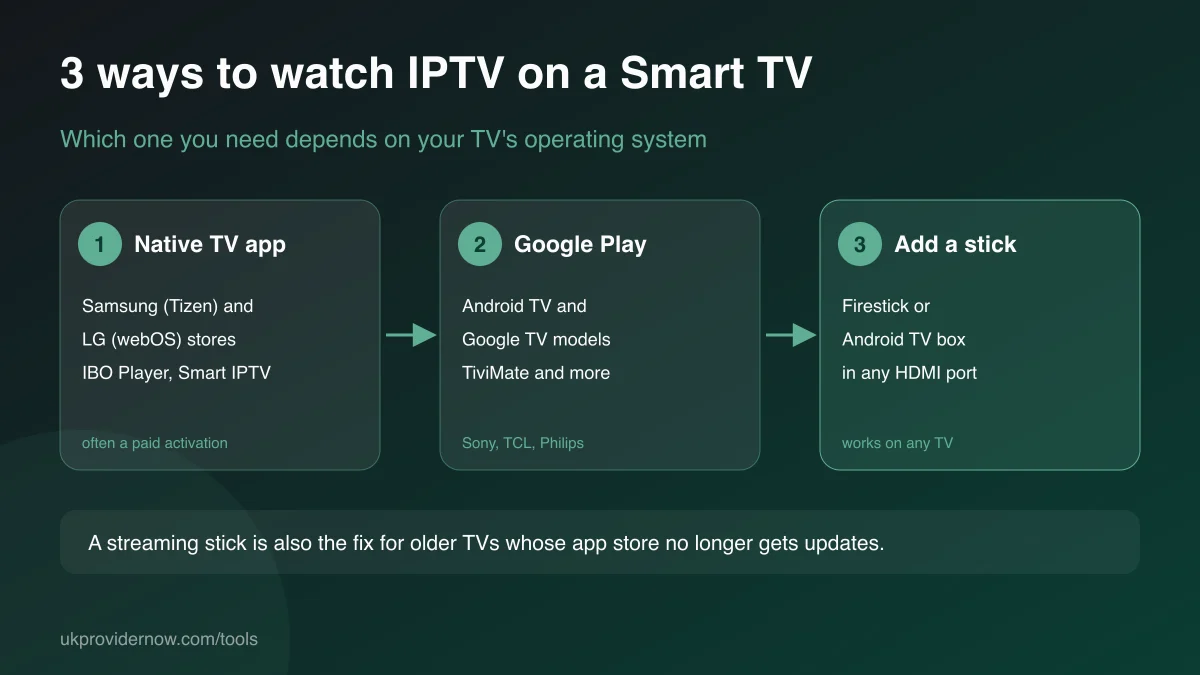
1. A native app on Samsung or LG. Both stores carry players such as IBO Player, Flix IPTV and Smart IPTV. They work, but they're simpler than the best Android players, and most charge a small one-off activation.
2. Google Play on Google TV and Android TV sets. Sony, most TCL and many Philips TVs have the full Play Store, so you get the same apps as a streaming box, including TiviMate andOTT Navigator.
3. Add a streaming stick. A Fire TV Stick or Google TV device plugged into any HDMI port turns any TV into a full IPTV player. This is the answer for VIDAA and Roku TVs, older TVs, and anyone who wants the widest app choice.
Smart TV operating systems by brand
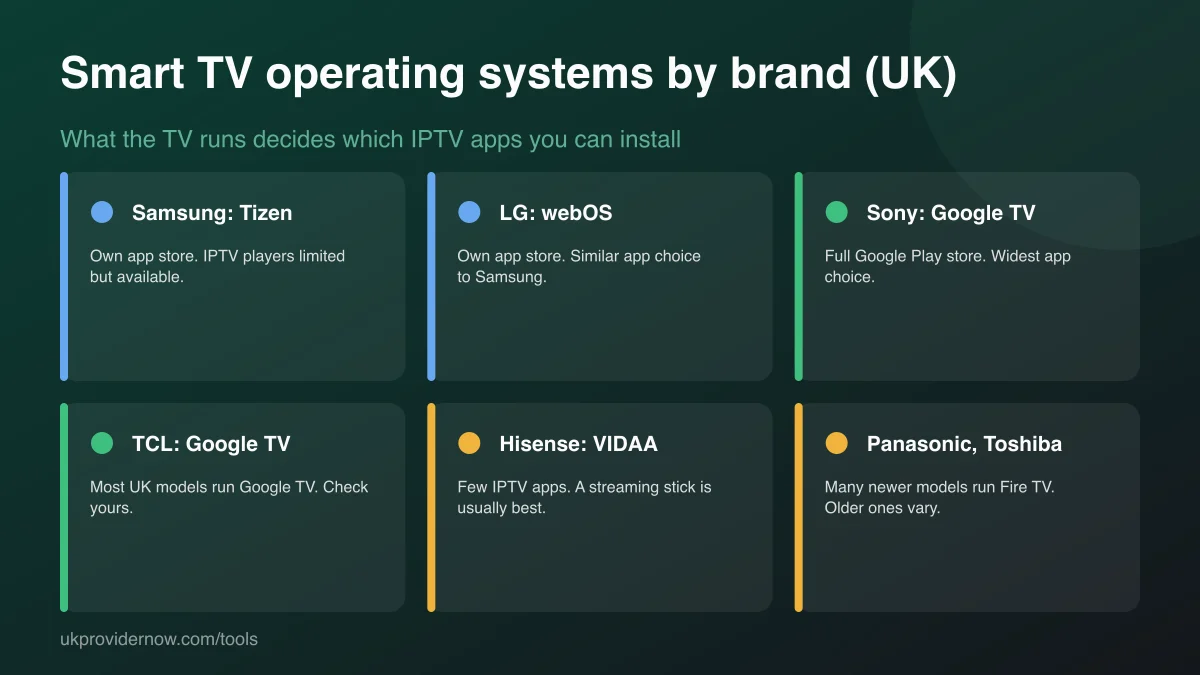
| Brand | Operating system (UK) | Native IPTV? |
|---|---|---|
| Samsung | Tizen | Yes, with a Tizen IPTV app |
| LG | webOS | Yes, with a webOS IPTV app |
| Sony Bravia | Google TV / Android TV | Yes, with the full Google Play store |
| TCL | Google TV on most UK models | Usually yes, if it's a Google TV model |
| Philips | Google TV / Android TV, or Titan OS | Depends on the model |
| Hisense | VIDAA on most UK models | Best with a streaming stick |
| Panasonic | Fire TV (newer), My Home Screen (older) | Newer Fire TV models: yes. Older models: use a stick |
| Toshiba | Fire TV or VIDAA | Fire TV models: yes. VIDAA models: use a stick |
| Amazon Fire TV (Omni and Fire TV Edition) | Fire OS | Yes, just like a Firestick |
| Roku TV (Sharp, some TCL and Hisense) | Roku OS | No: add a streaming stick |
How to check your TV's operating system
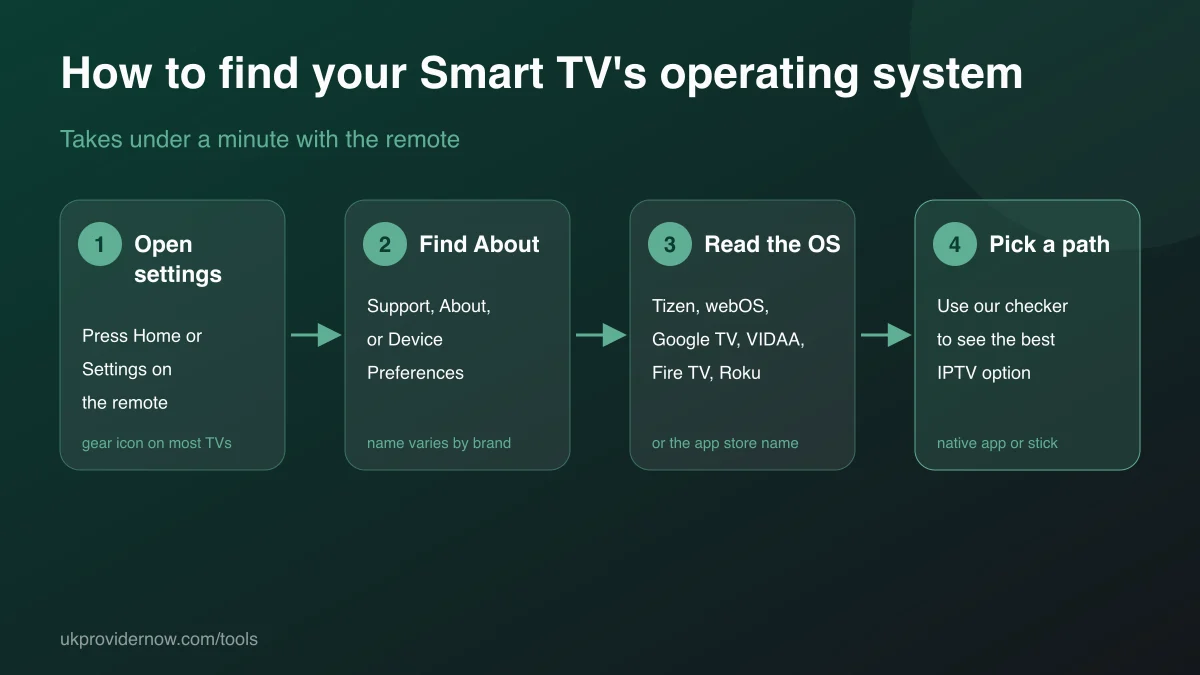
- Press Home or Settings on the TV remote.
- Look for About, Support, Device Preferences or System information.
- Find the software or operating system name: Tizen, webOS, Google TV, Android TV, VIDAA, Fire TV, Roku or Titan OS.
- Not listed? Look at the app store icon on the home screen, which usually carries the system's name.
Setting up a Samsung or LG IPTV app
- Install the player from the TV's app store and open it. It displays a MAC address and sometimes a device key.
- On a phone or computer, go to the app developer's official website and open its playlist upload page.
- Enter the MAC address and key, and add your M3U link or Xtream Codes login.
- Restart the app on the TV. Your channels load. Check the link first with the M3U validator if it doesn't.
Which streaming stick to add
A Fire TV Stick 4K is the most common choice in the UK, is easy to set up and supports every popular IPTV player. A Google TV device suits people who already use Android. Before you buy, check theFirestick IPTV setup checker for which Fire TV model to avoid for IPTV, and our device guide for a full comparison.
Limitations
This is guidance by brand and platform, not a check of your exact TV model or firmware. Brands change systems between model years and app store listings change over time, so confirm the operating system on your TV using the steps above. Nothing you select is stored.
Frequently asked questions
Can I watch IPTV on a Smart TV without a Firestick?
Often, yes. Samsung and LG TVs have IPTV players in their own app stores, and Sony, TCL and many Philips TVs run Google TV with the full Play Store. You need a streaming stick when your TV runs VIDAA or Roku, is too old for app updates, or doesn't have a suitable app in its store.
What's the best IPTV app for a Samsung TV?
The main options in Samsung's store are IBO Player, Flix IPTV and Smart IPTV. They all accept an M3U link, and IBO Player also accepts an Xtream Codes login. Most offer a free trial then a one-off activation through the developer's website.
What's the best IPTV app for an LG TV?
The same apps as on Samsung: IBO Player, Flix IPTV and Smart IPTV, from the LG Content Store. Setup is the same: note the MAC address shown in the app, then add your playlist on the developer's website.
Why does my TV's IPTV app need a MAC address?
Apps like Smart IPTV and IBO Player link your playlist to your TV using the MAC address the app displays. You enter that MAC and your M3U link on the developer's website, and the app loads the playlist. It's app activation, separate from your IPTV subscription.
Is a Firestick better than a Smart TV app?
Usually, yes. Streaming sticks get app updates for longer, have a wider choice of players such as TiviMate, and are often faster than a TV's built-in processor. A Smart TV app is fine if it's available for your TV and you don't mind a simpler guide.
How do I find out which operating system my TV runs?
Open Settings and look under About, Support or Device Preferences for the system name. The app store is another clue: Google Play means Google TV or Android TV; Samsung Apps means Tizen; LG Content Store means webOS; VIDAA and Roku show their own branding.
Related tools
Last updated