
IPTV Resolution Calculator
Can your internet handle 4K? Enter your speed, or measure it, and the number of screens to see the best IPTV quality you can watch smoothly.
| Quality | Needed for your screens | Your line |
|---|
An IPTV resolution calculator matches your internet speed to the best picture quality you can stream without buffering. Each resolution step needs more data every second, and every extra screen watching at the same time adds its own stream. This calculator:
- Compares your speed with what SD, HD, Full HD and 4K each need.
- Multiplies by your screens, since two TVs need twice the bandwidth of one.
- Keeps 25% spare for phones, updates and normal ups and downs.
- Can measure your speed if you don't know it, using a real download test in your browser.
SD, HD, Full HD and 4K compared
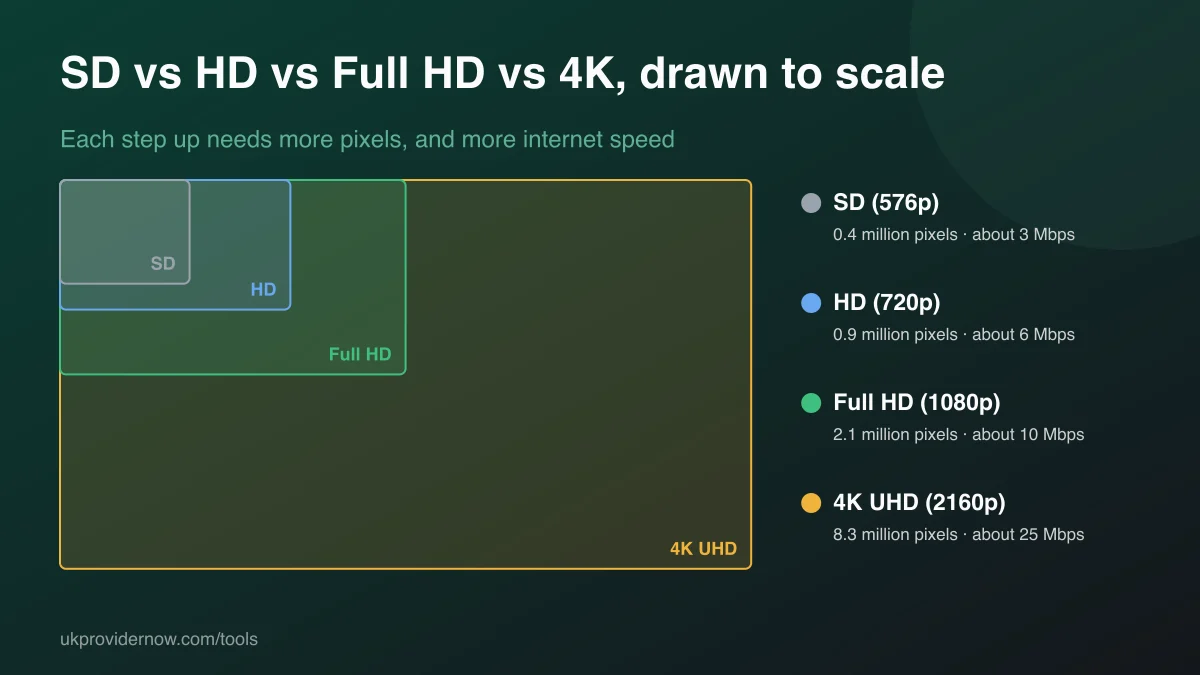
| Quality | Pixels | Minimum | Recommended (with headroom) |
|---|---|---|---|
| SD (576p) | 720 × 576 | 3 Mbps | 4 Mbps |
| HD (720p) | 1280 × 720 | 6 Mbps | 7.5 Mbps |
| Full HD (1080p) | 1920 × 1080 | 10 Mbps | 12.5 Mbps |
| 4K UHD (2160p) | 3840 × 2160 | 25 Mbps | 31.25 Mbps |
On a TV under about 40 inches viewed from the sofa, the difference between HD and Full HD is small. It's clearer on larger screens, and 4K pays off mainly on 55 inches and above. So if your speed is borderline, a step down in quality costs less picture than you might expect, and removes buffering entirely.
How to use the calculator
- Enter your download speed in Mbps. Use a speed measured on the TV or streaming device, not the headline speed of your broadband package.
- If you don't know it, press Measure my speed. It runs the same download test as our IPTV speed test.
- Set the number of screens that might stream at the same time.
- Read the best quality at the top, then the table for each level.
Speed for more than one screen
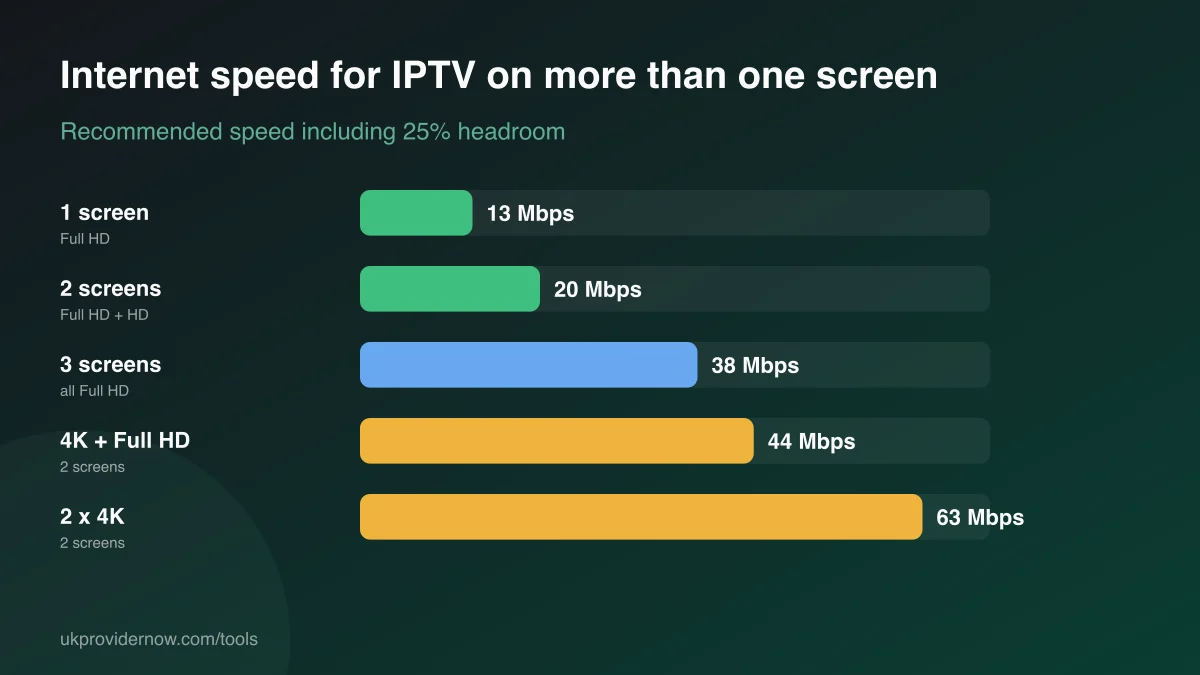
Every screen watching at once is a separate stream, so the needs add up. A household with a Full HD TV in the living room and an HD TV in the bedroom needs about 20 Mbps with headroom; three Full HD screens need about 38 Mbps. With a mix of qualities, add each screen's recommended figure together. If there isn't enough for everyone in Full HD, putting smaller screens on HD is the easiest saving.
What else you need for 4K IPTV
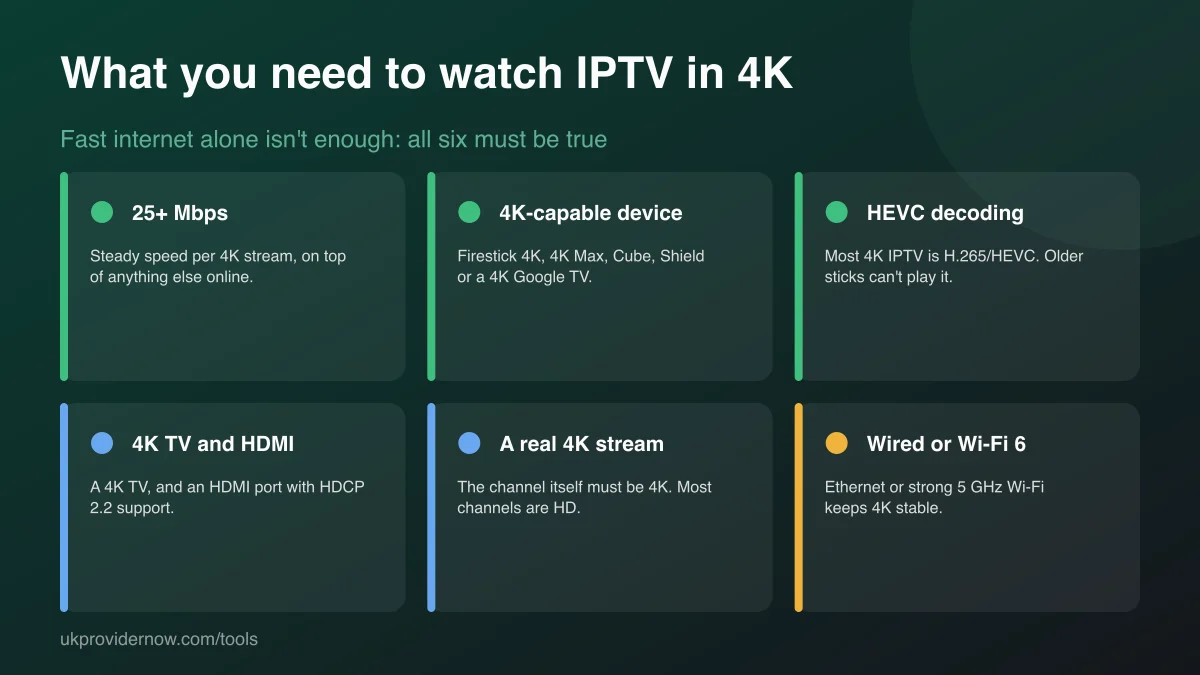
A fast connection is only the first requirement. The device must handle 4K and the HEVC codec most 4K streams use: a Fire TV Stick 4K, 4K Max or Cube, or a 4K Google TV device, not the Lite or HD sticks. The TV needs to be 4K with an HDMI port supporting HDCP 2.2. And the channel itself has to be in 4K; most IPTV channels are HD or Full HD, with 4K usually limited to selected sport and films. See the Firestick checker and our device guide for 4K-capable hardware.
Resolution and data usage
Higher resolution uses more data as well as more speed: an hour of Full HD is about 3 GB, and 4K about 7 GB. On a capped or mobile plan, check your monthly total with the data usage calculator or the data cap calculator.
Limitations
The thresholds are widely used rules of thumb, not measurements of any particular provider's streams, which may be encoded higher or lower. A measured speed reflects the connection from your device to our servers at that moment. Nothing you enter is stored.
Frequently asked questions
What internet speed do I need for 4K IPTV?
About 25 Mbps per 4K stream as a minimum, and around 32 Mbps to be comfortable once other devices are online. Two 4K TVs at once need roughly 63 Mbps. Your device, TV and the channel itself also need to support 4K.
Is 10 Mbps enough for IPTV?
It's enough for one Full HD stream with little to spare, or one or two HD streams. For Full HD with other people online, 13 Mbps or more is more comfortable. 10 Mbps isn't enough for 4K.
What's the difference between HD, Full HD and 4K?
HD is 1280 × 720 pixels, Full HD is 1920 × 1080 (just over twice as many), and 4K UHD is 3840 × 2160 (four times Full HD). More pixels need more data, which is why each step up needs more internet speed.
Why add 25% headroom?
Home connections fluctuate, and phones, updates and other streams share the same line. A stream running right at the limit of your speed buffers the moment anything else uses the internet. Leaving about a quarter spare keeps playback smooth.
I have fast internet but can't get 4K. Why?
Speed is only one of several requirements. The device must decode 4K (usually in HEVC), the TV and HDMI port must support 4K with HDCP 2.2, the player app must be set to allow it, and the channel itself must be broadcast in 4K. Most IPTV channels are HD or Full HD.
Why do other calculators give different figures?
There's no single standard. Providers encode at different bitrates and newer codecs like HEVC need less data for the same picture. These thresholds are common rules of thumb for IPTV, not a guarantee for a particular provider.
Related tools
Last updated