
EPG Validator
Find out why your IPTV TV guide is empty. Check an XMLTV EPG link or file, including .gz, to see whether it's valid, how many channels and programmes it holds, and which dates it covers.
An EPG validator checks the file behind your IPTV app's TV guide. The guide comes from a separate link, usually in the XMLTV format, and when it's broken, out of date or mismatched, the guide grid stays empty even though the channels play. This validator tells you:
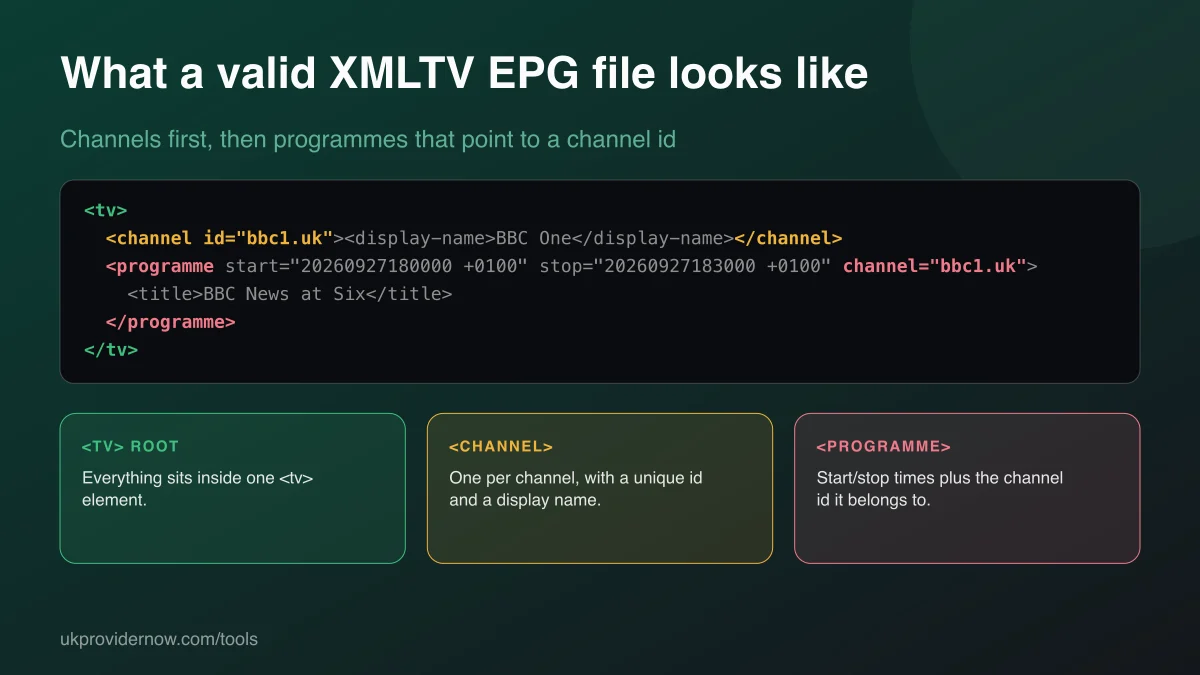
- Whether the file is a real XMLTV guide: valid XML with a
<tv>root, not an error page. - How much it contains: every
<channel>and<programme>, counted across the whole file. - Whether it's current: the first and last dates in the guide, with a warning if the listings have already run out.
- Which channel IDs it uses: examples you can compare with the
tvg-idvalues in your playlist.
How to check your EPG
- Find your EPG link. Providers usually send it with your login, labelled "EPG", "XMLTV" or "guide URL". In most apps it's under Settings, then EPG or TV guide.
- Paste the link and press Check link, or upload a
.xmlor.xml.gzfile. - Wait a few seconds. Full guides are often 20–100 MB unpacked, so large ones take up to fifteen seconds.
- Check the dates first: most empty guides are simply out of date.
Why your TV guide is empty
When channels play but the guide is blank, work through these three causes in order.
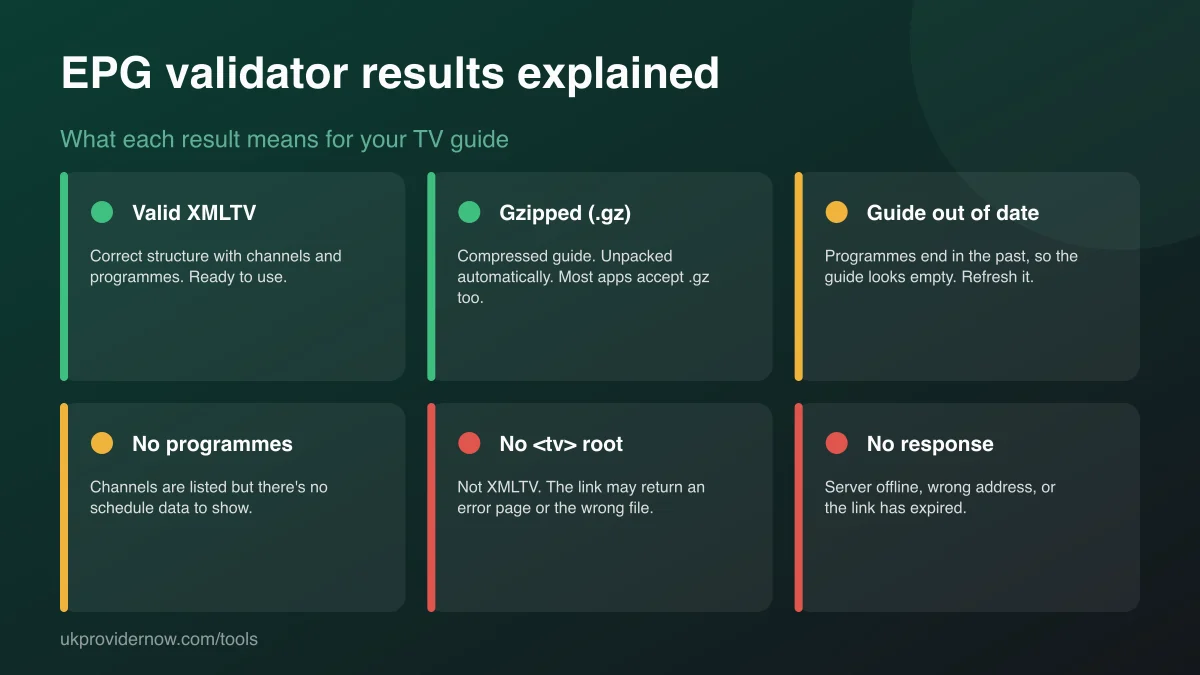
1. The guide link doesn't work. The link has expired, changed, or returns an error page. The validator shows this as "no response" or "this link returns a web page". Ask your provider for the current EPG link, then paste it into your app again.
2. The guide is out of date. Every programme in the file has already finished, so there's nothing to show for today. If the validator says the guide ended in the past, the provider's guide isn't updating. If the dates are current but your app still looks empty, force an EPG refresh in the app's settings.
3. The channel IDs don't match. Your app matches each channel in your playlist to the guide using the playlist's tvg-id and the EPG's <channel id>. They must be identical, including upper and lower case. One wrong character leaves that channel blank while the others work.
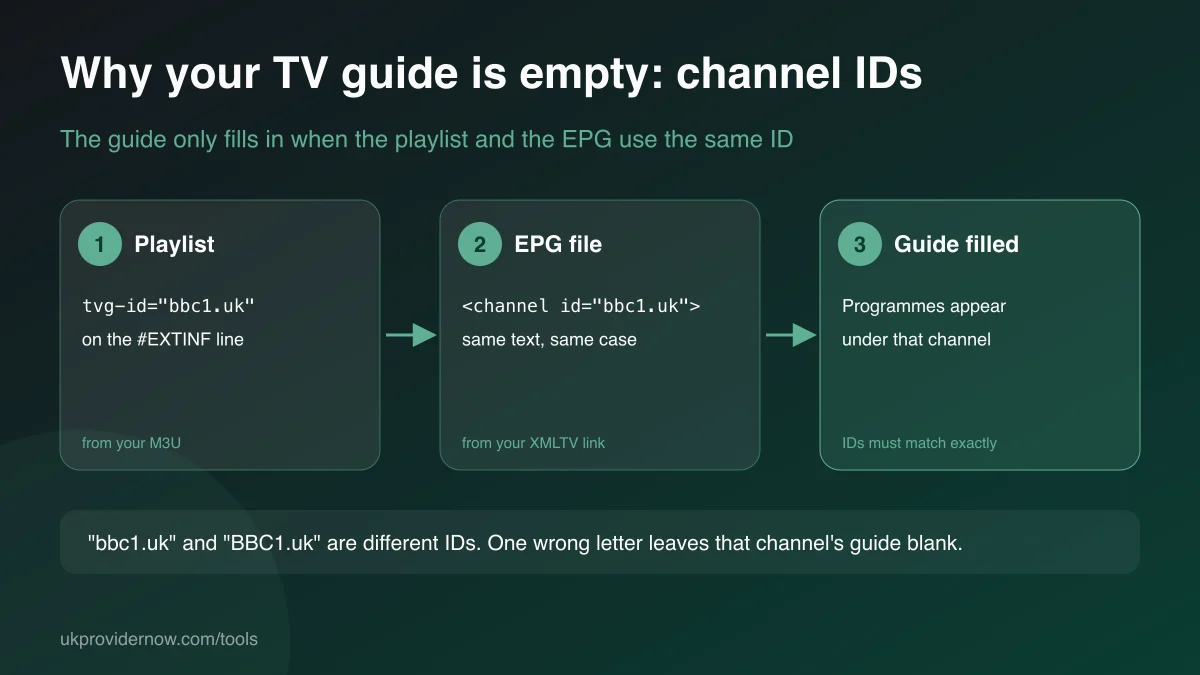
To compare the two, check your playlist with the M3U validator, which reports how many entries have a guide ID, then compare a few of them with the channel IDs listed here. Many apps, includingTiviMate and OTT Navigator, also let you assign a guide channel by hand when IDs don't match.
Understanding the results
| Result | Meaning |
|---|---|
| Channels | How many <channel> entries the guide defines. It doesn't need to match your playlist exactly, but channels missing here will have no listings. |
| Programmes | Every scheduled show in the file. A few thousand per day is normal for a large guide. |
| Guide starts / ends | The earliest and latest times in the file. If "ends" is in the past, the guide is stale. |
| Days remaining | How many days of listings are left from now. |
| Compressed | Whether the file was gzip-compressed. Both forms are fine. |
| Unmatched programmes | For uploaded files, programmes pointing at a channel id the file never defines. Players ignore these. |
EPG and Xtream Codes logins
If you log in with an Xtream Codes username and password, most apps fetch the guide automatically from the same server, at /xmltv.php, so there's no separate link to enter. If your guide is empty on an Xtream login, first confirm the account is active with the Xtream Codes Checker, then check the xmltv.php link here.
Privacy and limits
Links are fetched once by our server, counted and discarded. We never store the link or the guide, and only counts, dates and a few example channel names are returned. Addresses on private or local networks are blocked. Downloads stop at 60 MB unpacked or fifteen seconds; the result says if a count is a minimum because of that. The malformed-XML and unmatched-programme checks need the whole file, so they run on uploaded files only.
Frequently asked questions
What is an EPG?
EPG stands for electronic programme guide: the TV guide grid in your IPTV app showing what's on now and next. IPTV apps load it from a separate file, almost always in the XMLTV format, which lists channels and then every programme with its start and stop time.
What is XMLTV?
XMLTV is the standard file format for TV listings. It's an XML file with a <tv> root element containing <channel> entries (an id and display name) and <programme> entries (start and stop times, the channel id and a title). Guides are often gzip-compressed and end in .xml.gz.
Why is my IPTV TV guide empty?
The three usual causes are: the guide link is wrong or has expired, the guide data is out of date so every programme has already finished, or the channel IDs in your playlist (tvg-id) don't match the channel ids in the EPG. This validator checks the first two directly; for the third, compare the IDs it lists with the tvg-id values in your playlist.
Can I check an .xml.gz EPG file?
Yes. Compressed guides are detected automatically, whether you paste a link or upload the file, and unpacked before checking. Most IPTV apps also accept the .gz link directly, so you don't need to unpack it yourself.
How far ahead should an EPG go?
Most providers supply between two and seven days of listings. If the guide ends today or has already ended, your app will show empty slots until the file is refreshed. Apps refresh on a schedule you can usually set in their EPG settings.
Is my EPG link stored?
No. A link is fetched once by our server to count its contents and is never saved or logged. Uploaded files are read in your browser and never leave your device.
Why are some times in the guide an hour out?
XMLTV times include a timezone offset such as +0000 or +0100. If the guide uses UTC and your app doesn't apply the offset, programmes appear an hour early or late during British Summer Time. Most apps have an EPG time-shift setting to correct it.
Does a valid EPG mean every channel will have listings?
No. A valid file can still be missing some channels, or use different IDs from your playlist. The validator confirms the file itself is sound; matching still depends on your playlist's tvg-id values.
Related tools
Last updated