
M3U Playlist Analyzer
See exactly what's inside a large IPTV playlist: channels by type, every category, duplicates, metadata, stream hosts and errors. Upload a file for a private, in-browser analysis, or paste a link.
Overview
Categories
| Category | Entries |
|---|
Duplicates
Metadata coverage
Stream URLs
Errors
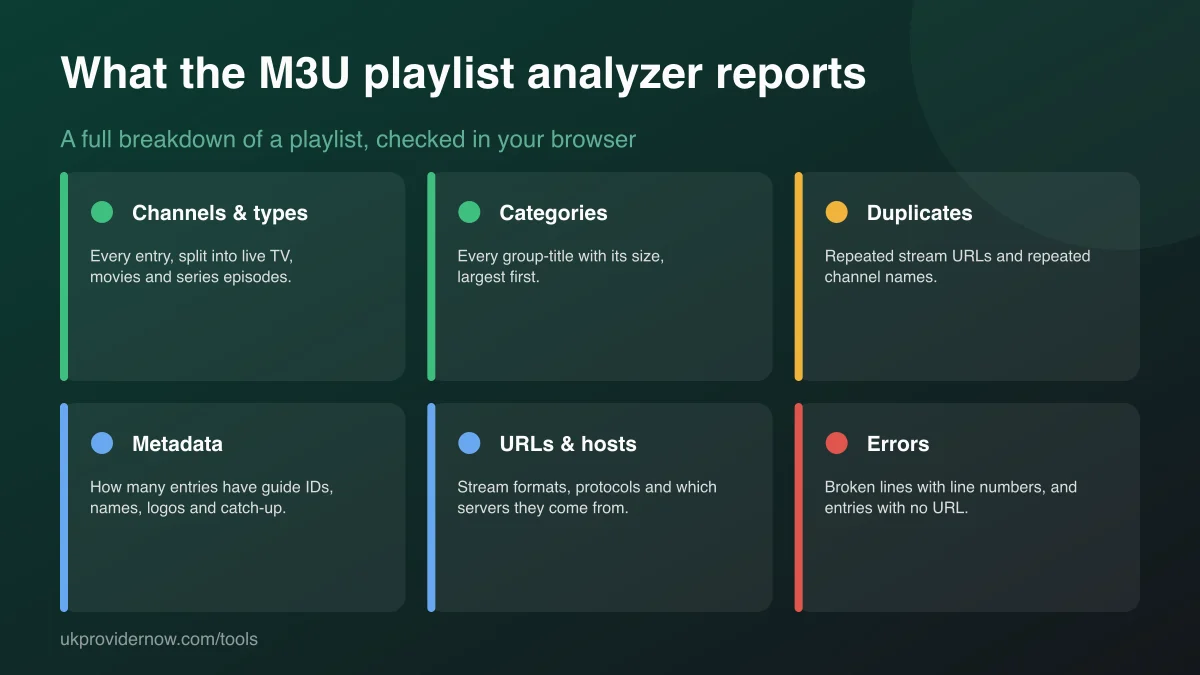
An M3U playlist analyzer reads an entire IPTV playlist and reports what's in it and how well it's put together. Player apps only show you the channels; they don't tell you that a fifth of the list is duplicates, that half the channels have no guide ID, or that the streams come from six different servers. This analyzer reports:
- Channels and types: total entries, split into live TV, movies and series episodes.
- Categories: every
group-titlein the list, largest first, plus entries with no category. - Duplicates: repeated stream URLs, and channel names used more than once.
- Metadata: how many entries carry a guide ID, display name, logo, category and catch-up information.
- URLs: stream formats (TS, HLS, video files), protocols, and which hosts serve the streams.
- Errors: broken lines, listed by line number so you can find and fix them.
How to analyse an M3U playlist
- For the most complete and private result, press Upload .m3u file and choose the playlist. Gzipped files are unpacked automatically.
- Or paste the playlist link and press Analyse link.
- Read the summary at the top, then work down the sections. Very large lists take a few seconds.
- If the playlist has exact duplicates, press Download without duplicate URLs to save a cleaned copy.
Only need a quick "does it work?" answer? The M3U validator is faster and counts the whole file even for huge links. Use the analyzer when you want the detail.
Understanding categories
Categories come from the group-title attribute on each #EXTINF line (or an#EXTGRP line). They decide how channels are grouped in your app. A playlist with hundreds of tiny categories is hard to browse; one with everything in a single category is worse. Entries with no category end up in an "Uncategorised" or "All" list in most apps. If you're choosing between playlists, the category breakdown shows at a glance what each one really covers.
Duplicates: which to remove and which to keep
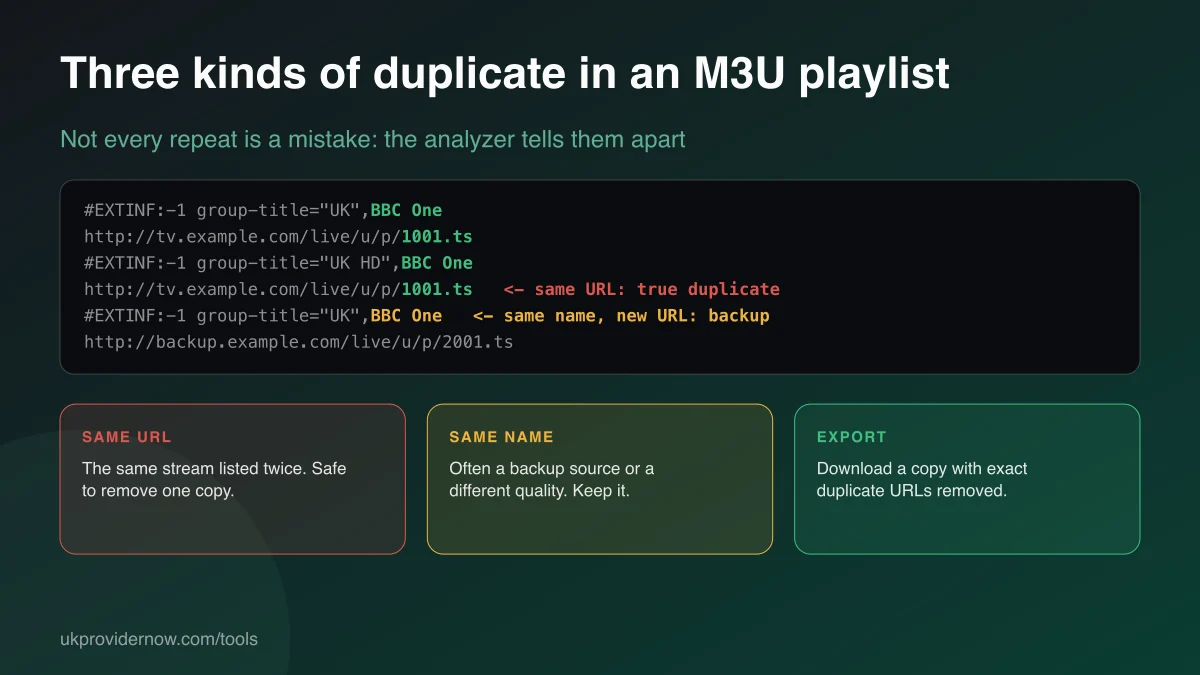
Duplicate URLs are the same stream listed more than once, often because a channel appears in two categories or two playlists were merged. They add clutter without adding anything, and are safe to remove; the download button does exactly that, keeping the first copy.
Duplicate names are different streams with the same channel name. These are usually intentional: backup sources, SD/HD/4K versions, or regional variants. The analyzer lists them so you can decide, but never removes them automatically.
Metadata coverage
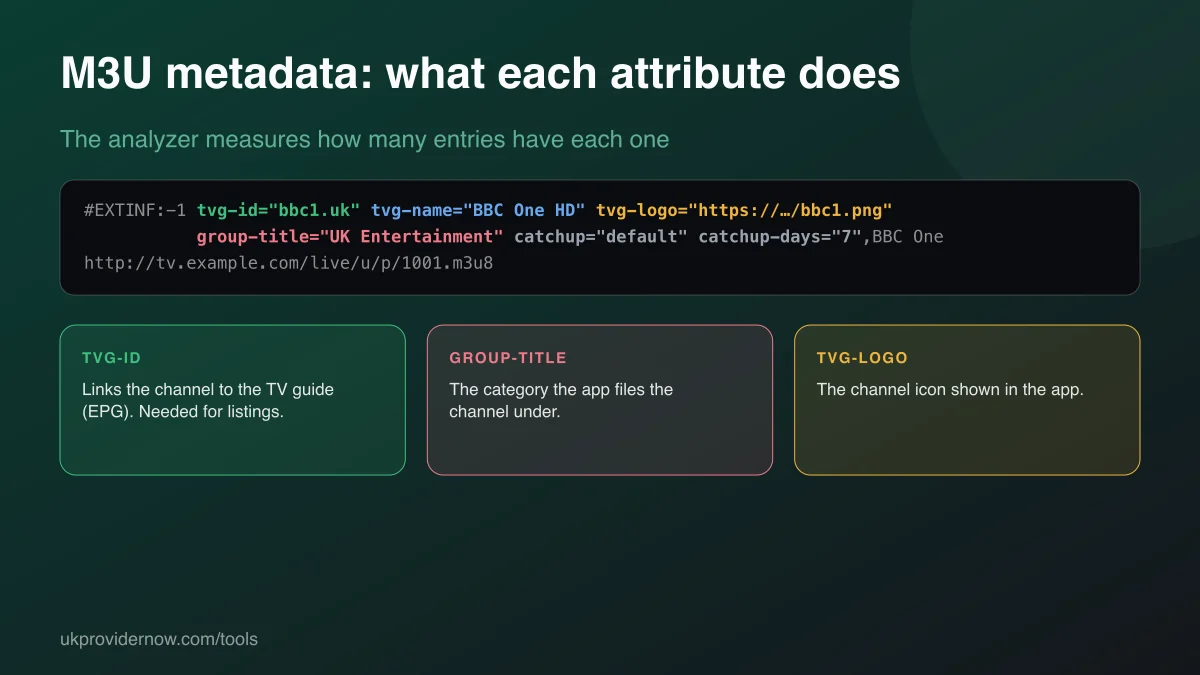
tvg-id is the most important attribute for live TV: it's how your app matches a channel to the TV guide. Low coverage on live channels means blank guide rows; check the IDs against your guide with theEPG validator. Films and series don't need a tvg-id, so a playlist heavy in on-demand content will naturally score lower. tvg-logo gives channel icons,group-title the categories, and catch-up attributes tell supporting apps (such asTiviMate) that past programmes can be replayed.
Stream URLs and hosts
The URL breakdown shows how the streams are delivered. MPEG-TS (.ts) is a continuous stream;HLS (.m3u8) is delivered in short segments and often copes better with unsteady connections. If one format buffers, many players let you switch; see the buffering test. The host list shows which servers carry the streams. A playlist spread across many unrelated hosts is usually a merged collection, and more likely to contain dead links.
Fixing errors
URL without #EXTINF: a stream address with no information line above it. Players either skip it or show it without a name. #EXTINF without URL: an information line with no stream after it, usually from a cut-off or hand-edited file. Invalid URLs can't be parsed as web addresses at all. The line numbers let you jump straight to each problem in a plain-text editor. Never edit M3U files in a word processor, which can join or split lines.
Xtream Codes playlists
If your playlist link contains username= and password=, it comes from an Xtream Codes server. The analyzer shows what the playlist contains; for the account itself (active or expired, expiry date, connection limit), use the Xtream Codes Checker. Most apps also work better with the login entered directly. See our IPTV app guides.
Privacy and limits
Uploaded files are analysed in your browser and never uploaded. Links are fetched once by our server, which returns the first 5 MB of the playlist to your browser for analysis and stores nothing. For larger links, the report says the analysis is partial and the download button is disabled, because a partial copy would be missing entries. Upload the file for a complete analysis. Addresses on private or local networks are blocked.
Frequently asked questions
What does an M3U playlist analyzer do?
It reads a whole IPTV playlist and gives you a breakdown you can't see in a player app: how many live channels, films and series episodes it holds, every category and its size, duplicate streams, how complete the metadata is, where the streams are hosted, and which lines are broken.
How is this different from the M3U validator?
The validator answers "does this playlist work?" quickly, from a link or a file. The analyzer answers "what's in this playlist and how clean is it?" in detail, with categories, duplicates, metadata, hosts and a de-duplicated download. Use the validator first, then the analyzer for a deeper look.
Is my playlist uploaded anywhere?
Not when you upload a file: it's read and analysed entirely in your browser. When you paste a link, our server fetches it once, passes the text straight to your browser for analysis, and doesn't store it.
What counts as a duplicate?
A duplicate URL is the same stream address listed more than once, which is safe to remove. A duplicate name is the same channel name on different stream addresses, which is often deliberate: a backup source, a different quality, or the same channel in two categories. The analyzer reports both separately and only removes exact URL duplicates in the download.
Why does the category list look different from my app?
Apps sometimes rename, merge or hide categories, and Xtream Codes logins use the server's own category list rather than the playlist's group-title values. The analyzer shows exactly what's written in the playlist file.
How big a playlist can it analyse?
Uploaded files are limited only by your device's memory; playlists with hundreds of thousands of entries work on a typical computer. Links are analysed from the first 5 MB of the playlist, roughly 25,000–40,000 entries, and the result tells you when a link was too large to analyse in full.
Does the analyzer check whether streams play?
No. It analyses the playlist file itself. Whether individual streams play depends on the provider's servers, your subscription and your player app.
Related tools
Last updated