
IPTV Expiry Date Checker
Check when your IPTV subscription expires. Paste your M3U or Xtream Codes link, upload your playlist file or enter your login to see the expiry date, days left, account status and connection limits instantly. Free, no sign-up, nothing stored.
An IPTV expiry date checker reads your subscription's details straight from your provider's server, the same way your player app does. It tells you:
- The expiry date: the exact day and time your subscription ends, in your own time zone.
- Days left: so you know when to renew before channels stop.
- The account status: active, expired, banned or disabled.
- Connection limits: how many devices can watch at once and how many are watching now.
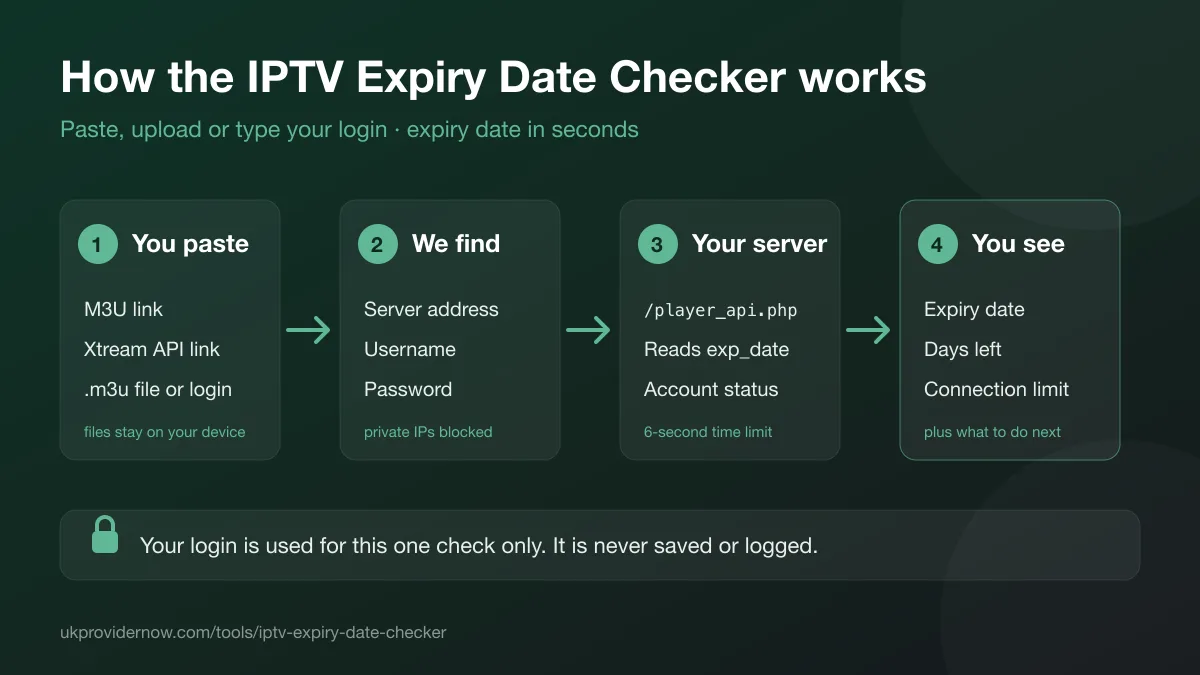
How to check your IPTV expiry date
- Find what your provider sent you: an M3U link, an Xtream Codes login (server, username and password), or a playlist file. It's usually in the welcome email or WhatsApp message.
- Paste the link under Paste a link, choose Upload file and pick the
.m3ufile, or switch to Enter login and fill in the three boxes. - Press Check expiry date. Most checks finish in a second or two.
- Read the expiry date and days left at the top, then the account status and connection limits underneath.
What you can check
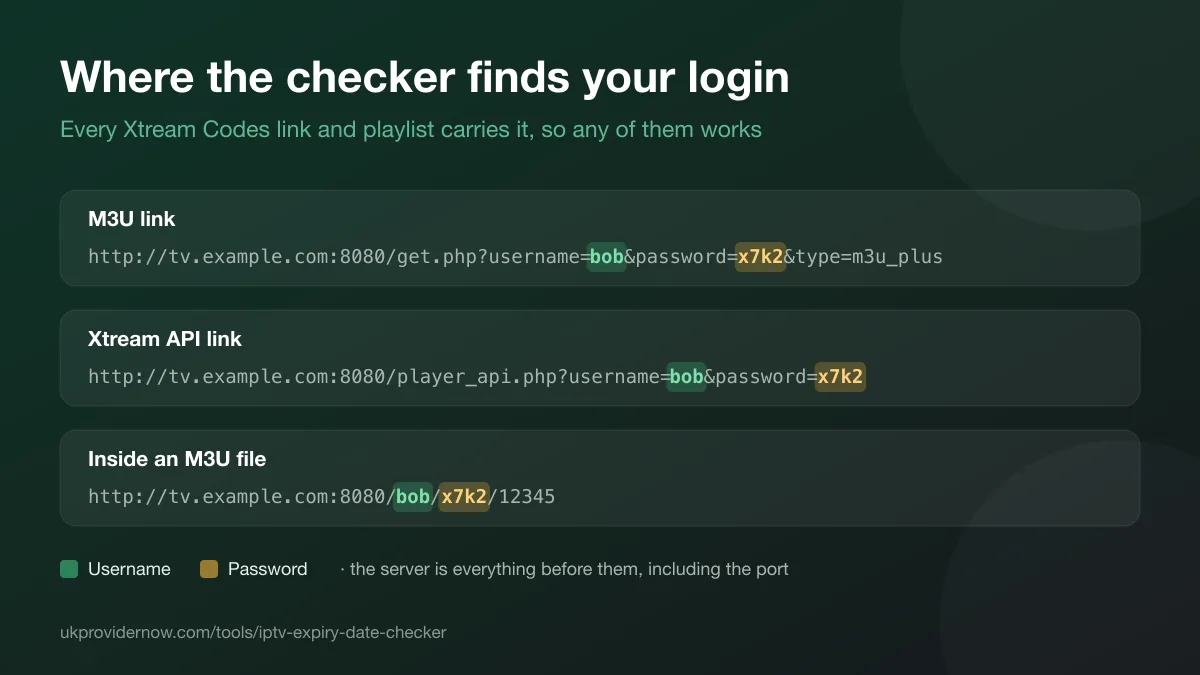
Almost every IPTV subscription runs on an Xtream Codes panel, and the panel puts your login in everything it gives you. That's why any of these work:
| What you have | Looks like | Works? |
|---|---|---|
| M3U link | …/get.php?username=…&password=… | Yes |
| Xtream Codes API link | …/player_api.php?username=…&password=… | Yes |
| Xtream Codes login | Server URL, username and password | Yes |
| M3U playlist file | A .m3u or .m3u8 file from your provider | Yes, when its stream links contain your login |
| Short or custom playlist link | Any other link to your provider's playlist | Yes, when the playlist's stream links contain your login |
| MAC or Stalker portal | A MAC address and portal URL | No. Check in your app or ask your provider |
Other ways to find your IPTV expiry date
- In your player app. IPTV Smarters Pro shows the expiry date on its home screen. In TiviMate, open Settings, then Playlists, and choose your playlist.
- In a web browser. Open
http://your-server:port/player_api.php?username=YOUR_USERNAME&password=YOUR_PASSWORD. Theexp_datevalue is the expiry date as a Unix timestamp, which this checker converts for you. - From your provider. Your welcome message or customer dashboard usually shows it. Customers of UKProviderNow can see it on their dashboard.
What your result means
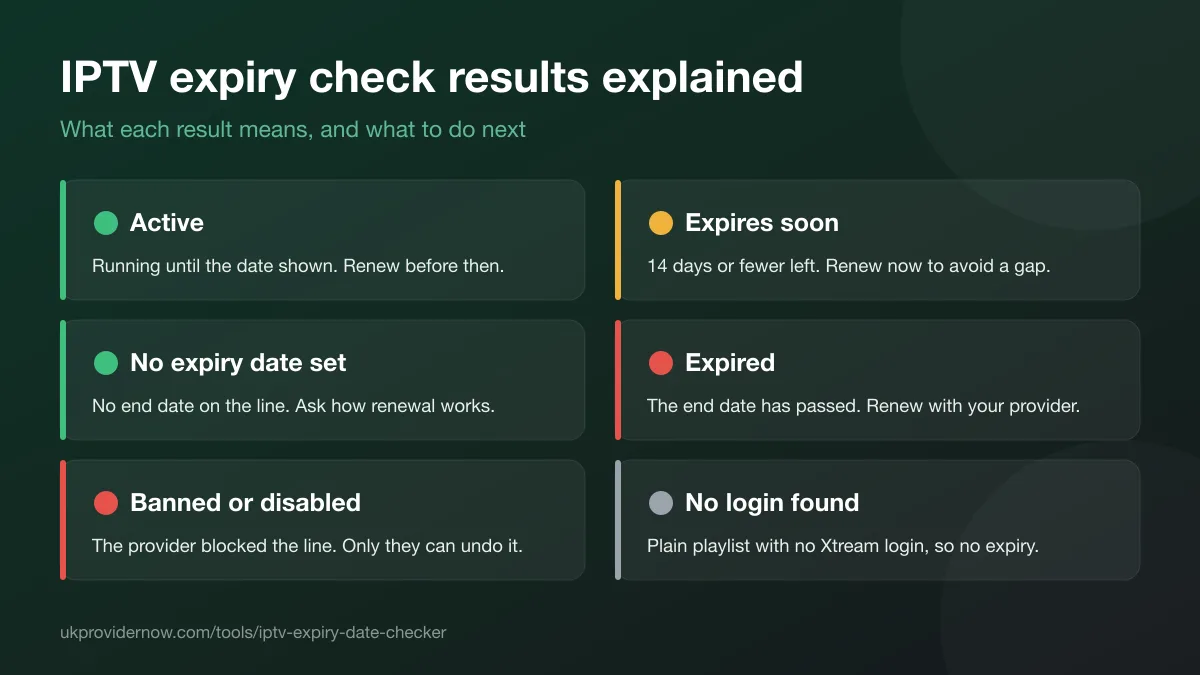
| Result | What it means | What to do |
|---|---|---|
| Active | The subscription is running until the date shown. | Nothing yet. Renew before the expiry date to avoid a gap. |
| Expires soon | Fewer than 14 days are left. | Renew now. Most providers extend the same login. |
| No expiry date set | The panel has no end date for this line. | Ask your provider how renewal works. |
| Expired | The end date has passed. | Renew with your provider. Apps may still log in but show no channels. |
| Banned or disabled | The provider has blocked or switched off the line. | Only the provider can fix this. Contact them. |
| Login not recognised | The server didn't accept the username and password. | Copy them again from your provider's message, or from the app that works. |
Privacy
IPTV servers don't answer other websites' browser code, so the check runs on our server. Your login goes there over HTTPS, is used for one request to the server address you gave, and is then discarded. It's never written to a database or log, and the password is never sent back to the page. Uploaded files stay on your device: only the server, username and password found in them are sent. Addresses on private or local networks are blocked.
What this tool can't do
It reads the account, not playback. To see how many channels, films and series your login includes, use theXtream Codes Checker. If channels buffer while the account is active, try the IPTV speed test and thebuffering test.
Frequently asked questions
How do I check my IPTV expiry date?
Paste the M3U or Xtream Codes link your provider sent you into this checker, upload your .m3u playlist file, or type in the server URL, username and password. The checker asks your provider's server for the account details and shows the expiry date, the days left and the account status in a second or two. You can also look in your player app: IPTV Smarters Pro shows the expiry date on its home screen, and TiviMate shows it in the playlist's settings.
Can I check the expiry date from an M3U link?
Yes, if the playlist comes from an Xtream Codes panel, which most IPTV subscriptions do. Links ending in get.php contain your username and password, and the checker uses them directly. For other playlist links, the checker downloads the start of the playlist and reads the login from the stream links inside it. A playlist with no login in it, such as a free public channel list, has no expiry date to find.
Can I check the expiry date from an M3U file?
Yes. Choose Upload file and pick the .m3u or .m3u8 file. The file is read in your browser and never uploaded. The checker finds the server, username and password in the playlist's stream links and sends only those to check the account.
What is an Xtream Codes API link?
It's the address IPTV apps use to sign in to an Xtream Codes panel, such as http://server:8080/player_api.php?username=…&password=…. Opening it in a browser returns the account details as raw data, with the expiry date as a Unix timestamp (exp_date). This checker reads the same data and turns it into a normal date and the number of days left.
What does "No expiry date set" mean?
The panel returned no end date for the line. Providers do this for lines they renew by hand or sell without a fixed term. The account still works for as long as the provider keeps it switched on, so ask them how renewal works.
My subscription shows as expired but my app still logs in. Why?
Many Xtream Codes panels still accept an expired login, so the app opens normally but channel, film and series lists are empty or streams won't start. Renewing with your provider brings everything back, usually on the same login.
What are max connections and active connections?
Max connections is how many devices can stream on the line at the same time. Active connections is how many are streaming right now. If both numbers are the same, another device will be refused until one stops watching.
Which time zone is the expiry time shown in?
Your device's own time zone. The panel stores the expiry as a universal timestamp, and your browser converts it, so the date and time are correct wherever you are.
Is my login or playlist stored?
No. Your details go to our server over HTTPS, are used for one request to the provider's server you gave, and are then discarded. They're never written to a database or log, and the password is never sent back to the page.
Does it work with MAC address or Stalker portal subscriptions?
No. MAC and Stalker portals don't use the Xtream Codes API this checker reads. The expiry date usually appears in the app you activated the MAC address in, or your provider can tell you.
Related tools
Last updated