
Best IPTV App for Samsung TV in 2026: What Actually Works on Tizen
The best IPTV app for Samsung TV is IBO Player for most people, with Hot Player close behind. Every app that runs on Tizen compared, how to install one, the MAC address system explained, and when a streaming stick is better.

Published 10 min read
In this article
- The quick answer
- Why Samsung TVs have fewer IPTV apps
- The best IPTV apps for Samsung TV, compared
- How to install an IPTV app on a Samsung TV
- MAC address and device key: what they are
- Samsung app or a streaming stick?
- Fixing common Samsung IPTV problems
- Using UKProviderNow on a Samsung TV
- Best IPTV app for Samsung TV: FAQs
- What is the best IPTV app for Samsung Smart TV?
- Is there a free IPTV app for Samsung TV?
- Can I install TiviMate on a Samsung TV?
- Can I install IPTV Smarters on a Samsung TV?
- Why can't I find an IPTV app in the Samsung app store?
- Do I need to pay for activation on every Samsung TV?
- Do I need a VPN for IPTV on a Samsung TV?
- Does IPTV work on older Samsung TVs?
The best IPTV app for Samsung TV in 2026 is IBO Player for most people, with Hot Player a close second. Both are in the Samsung app store, both support Xtream Codes logins with a full TV guide, and both let you test free before a small one off activation. This guide compares every IPTV app that actually runs on Samsung's Tizen Smart TVs, shows how to install one and add your subscription, explains the MAC address and device key system these apps use, and tells you honestly when an inexpensive streaming stick plugged into your Samsung is the better answer.
The quick answer
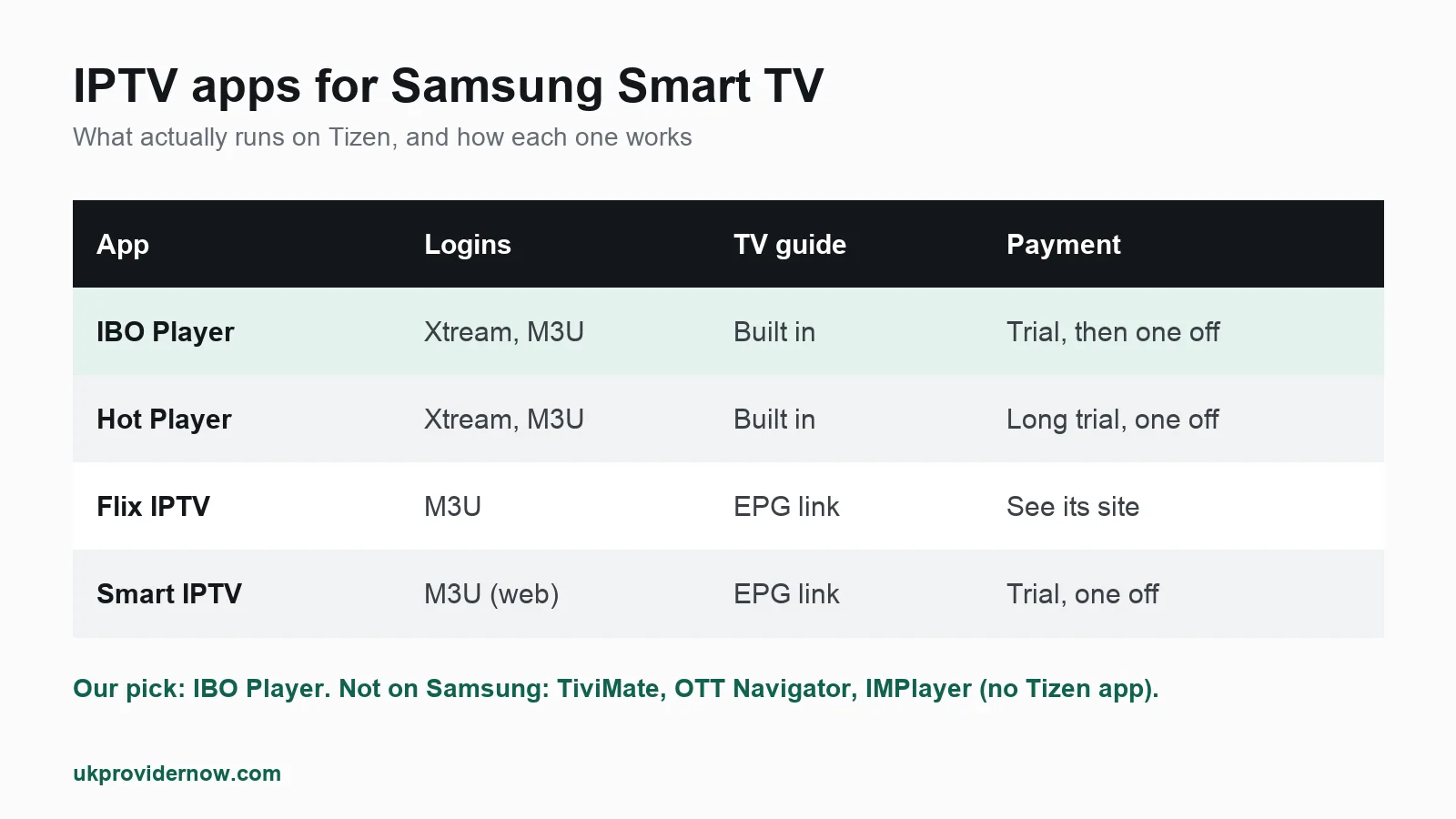
| App | Login types | TV guide | How you pay | Our verdict |
|---|---|---|---|---|
| IBO Player | Xtream Codes, M3U | Yes | Free trial, then one off activation | Best overall |
| Hot Player | Xtream Codes, M3U | Yes | Long free trial, then one off activation | Best for long trials and mixed TV brands |
| Flix IPTV | M3U | Yes, with an EPG link | Free to download, activation terms on its site | Good simple M3U player |
| Smart IPTV | M3U via its website | Yes, with an EPG link | Trial, then one off activation | Older, often missing from the store |
Our pick: IBO Player. It loads channels, films, series and the TV guide from a single Xtream Codes login, the same player also runs on Firestick, Android and LG, and activation is a one off per TV. Hot Player is the better choice if you want a longer free trial or have Samsung, LG and Hisense (VIDAA) TVs in the same house.
If you want the best possible experience: plug a Fire TV Stick or Google TV streamer into your Samsung and use TiviMate. We explain why further down.
Every app here is only a player. None of them includes channels. You add a login from your IPTV provider and the app plays it.
Why Samsung TVs have fewer IPTV apps
Samsung Smart TVs run Samsung's own system, Tizen, not Android. That has two effects:
- Android apps do not run on Samsung TVs. TiviMate, OTT Navigator, IMPlayer and XCIPTV, some of the most popular Android players, are not available on Tizen.
- You can only install apps from Samsung's own app store. Unlike Android, there is no simple way to install an app from a website, so if an app is not listed in the store for your country and model, you cannot get it.
That is why the same handful of names come up for Samsung: IBO Player, Hot Player, Flix IPTV and Smart IPTV. Store listings also change by country and by TV model year, so an app you see in a video may not appear on your TV.
Check what runs on your exact model in seconds with our Smart TV IPTV checker.
The best IPTV apps for Samsung TV, compared
1. IBO Player: best IPTV app for most Samsung owners
IBO Player is the app we set up most often on Samsung TVs. It supports Xtream Codes, so one login loads live channels, the TV guide, films and series together, which is far easier than juggling an M3U link and a separate guide link.
- Works on: Samsung and LG Smart TVs, Android TV, Firestick, Android phones and Apple devices.
- Free trial: yes, then a one off activation per TV.
- Why we pick it: clean layout, a proper TV guide, and the same app on every other device in the house.
- Watch out for: fake "IBO" copies in some stores and on websites. Only activate through the developer's official site.
See our IBO Player guide, and how activation works in our guide to IBO Player and Hot Player lifetime activation.
2. Hot Player: best for a long free trial
Hot Player works the same way as IBO Player: install it, note the device ID it shows, add your playlist through its website, and activate after the trial. Its main strengths are a long free trial and support for more TV systems, including Samsung, LG, Hisense VIDAA and Roku.
- Login types: Xtream Codes and M3U.
- Best for: testing a service for longer before paying anything, or households with several TV brands.
3. Flix IPTV: a simple M3U player
Flix IPTV has native Samsung Tizen and LG webOS apps. It works with M3U playlists, so you add your playlist link and, if the guide is empty, a separate EPG link. It is a sensible choice if your provider only gives you an M3U link, but an Xtream Codes player like IBO Player is easier with a full subscription.
See our Flix IPTV guide.
4. Smart IPTV: the original, now hard to get
Smart IPTV was the first IPTV player many Samsung owners used. It uses your TV's MAC address: you upload your M3U playlist on the developer's website against that MAC, and the TV loads it. It is no longer listed in the Samsung store in many regions. If you already have it installed, it keeps working, but for a new setup we recommend IBO Player or Hot Player instead.
See our Smart IPTV guide.
What about IPTV Smarters and TiviMate on Samsung?
People search for them all the time, so it is worth being clear: TiviMate has no Samsung app, because it is Android only. IPTV Smarters has had Smart TV versions in the past, but availability in the Samsung store comes and goes. Any "TiviMate for Samsung" download you find on a website is not the real app. If you want TiviMate, use a streaming stick (see below).
How to install an IPTV app on a Samsung TV
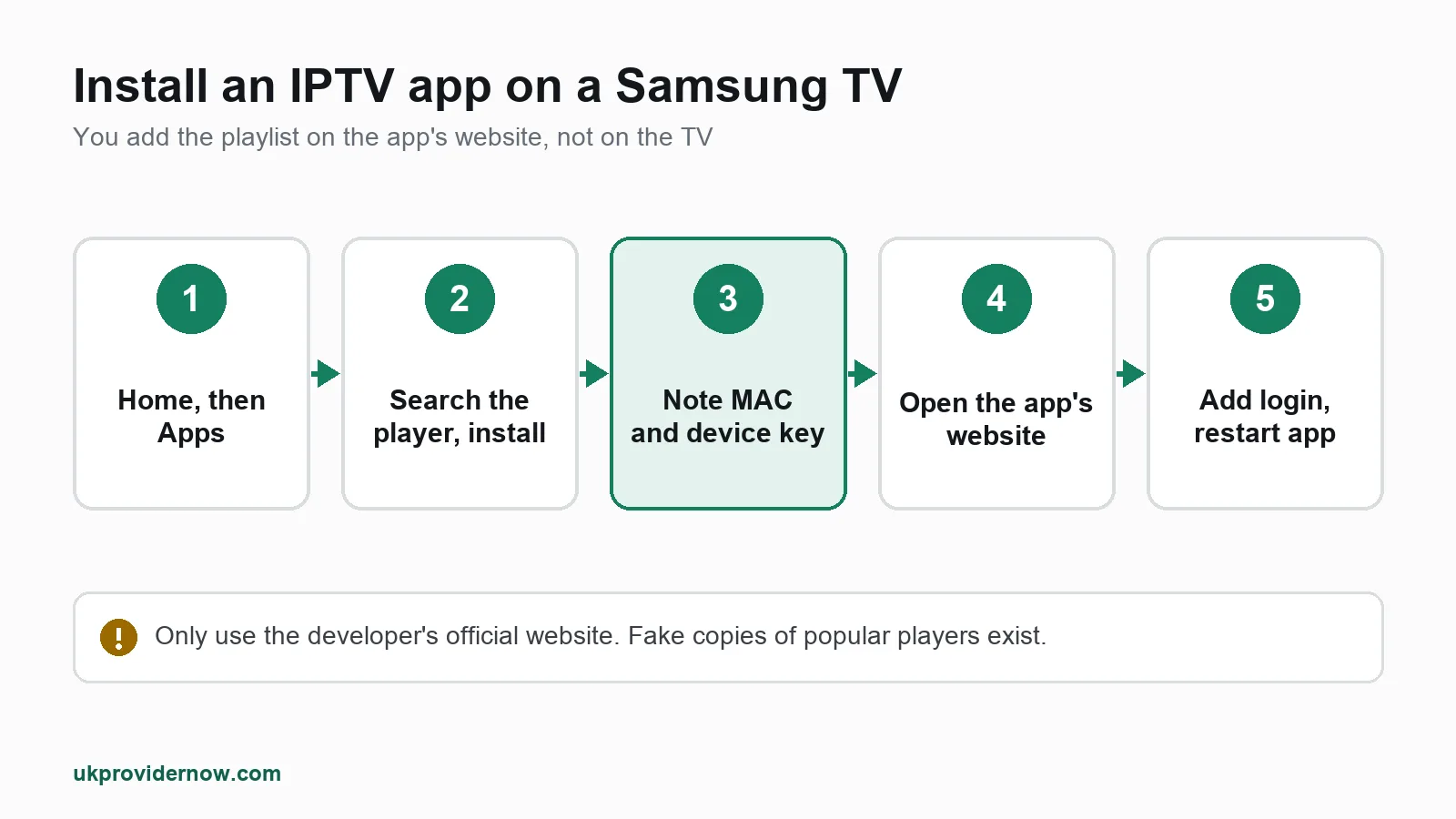
The steps are the same for IBO Player, Hot Player, Flix IPTV and Smart IPTV:
- Press Home on your Samsung remote and open Apps.
- Search for the player by name, for example "IBO Player".
- Install and open it. The first screen shows a MAC address (or device ID) and usually a device key. Write both down or take a photo.
- Go to the app's official website on your phone or computer, find the "upload playlist" or "manage playlist" page and enter the MAC address and device key.
- Add your IPTV login. Choose Xtream Codes if the app offers it and enter the server address, username and password from your provider. Otherwise paste your M3U link.
- Restart the app on the TV. Your channels and TV guide load.
The key point: with Samsung IPTV apps, you add your playlist on the app's website, not on the TV. The MAC address is how the website knows which TV to send it to.
Before you start, it is worth checking your login works with our Xtream Codes checker, or your M3U link with the M3U validator. It rules out a typo before you blame the app.
MAC address and device key: what they are
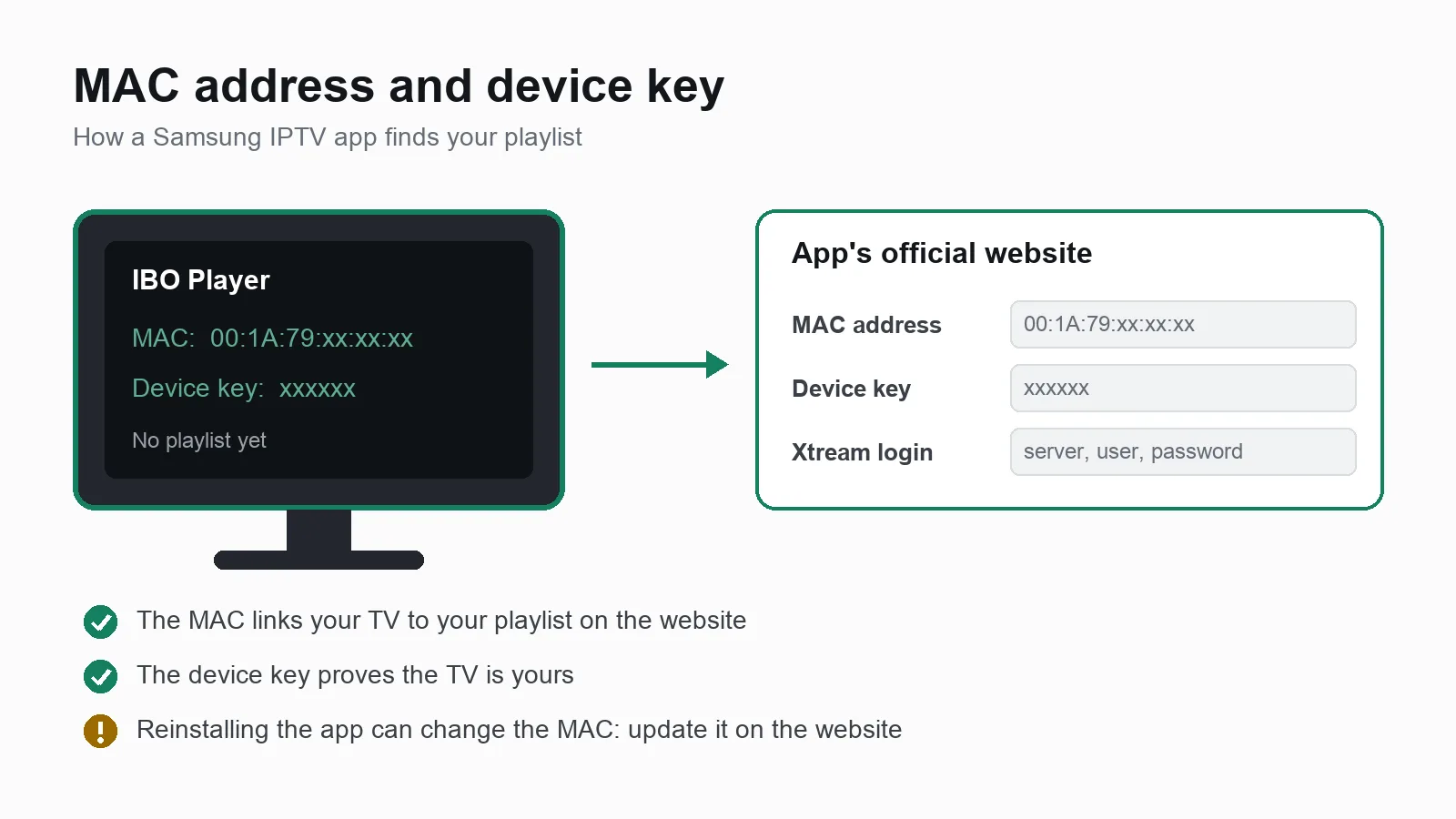
- MAC address: an ID the app shows for your TV, written like
00:1A:79:xx:xx:xx. In these apps it is usually generated by the app itself, not the TV's network MAC, so it can change if you reinstall the app. - Device key: a short code that proves you have the TV in front of you, so nobody else can change your playlist.
Keep both safe. You need them to change your playlist, renew activation or move your setup to a new subscription. If the app ever shows a different MAC after a reinstall, update it on the website.
Samsung app or a streaming stick?
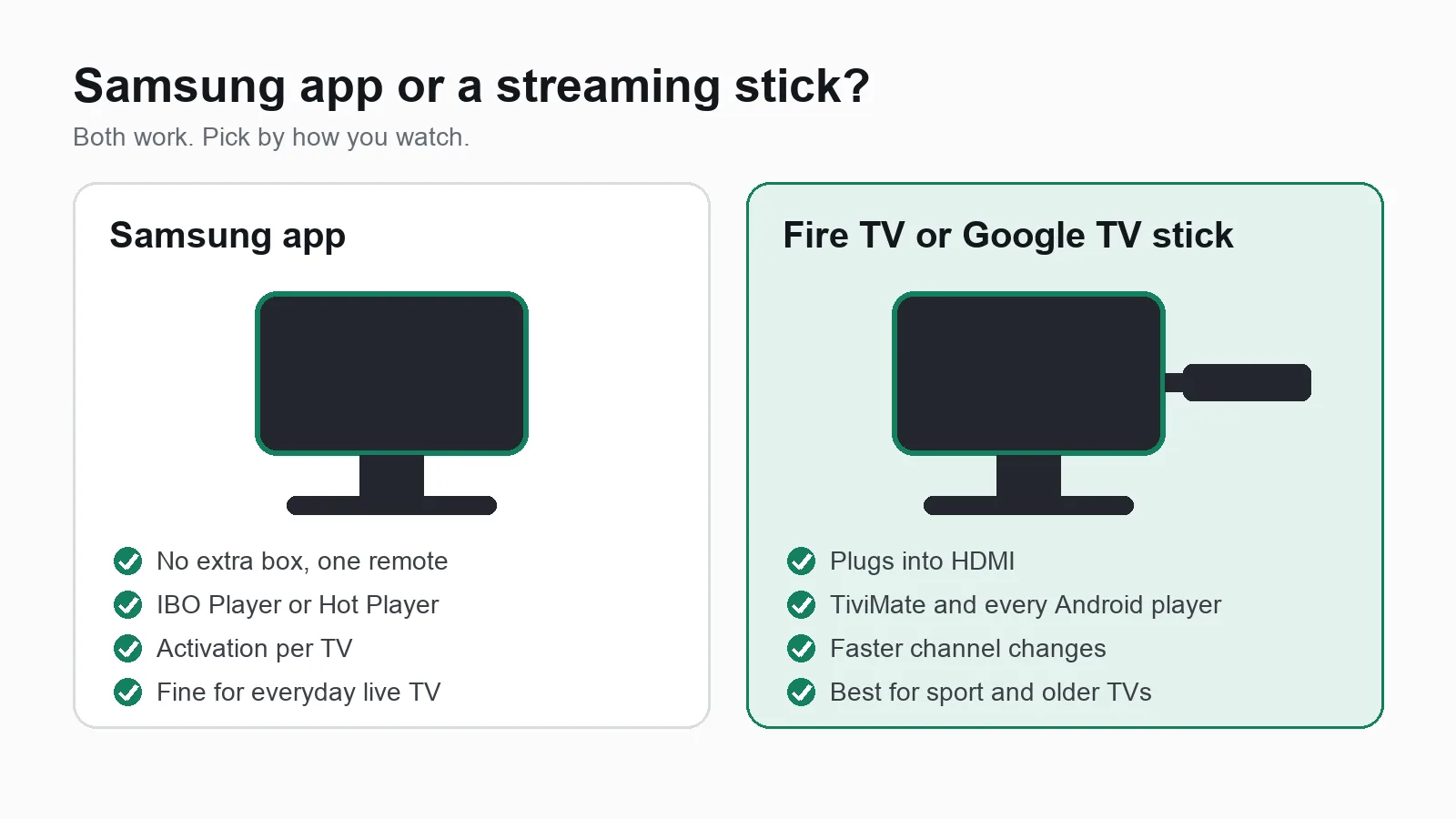
This is the honest part most guides skip. A Samsung IPTV app is convenient, but a streaming stick plugged into the same TV is often better:
| Samsung app | Fire TV Stick or Google TV | |
|---|---|---|
| Extra hardware | None | A stick in an HDMI port |
| Best player available | IBO Player, Hot Player | TiviMate, plus every Android player |
| Channel changes | Good | Usually faster |
| App choice | 4 or so apps | Dozens |
| Activation fee | Usually, per TV | Depends on the app |
| Works if the app leaves the Samsung store | Only if already installed | Yes |
Stick with the Samsung app if you want one remote, no extra box, and you mainly watch live channels.
Get a stick if you watch a lot of sport and want the fastest zapping, want TiviMate's cable box style guide, or have an older Samsung that feels slow. Our guide to the best IPTV player for Android covers the stick options, and our IPTV devices guide compares the hardware.
Fixing common Samsung IPTV problems
The app is not in the Samsung store. Store listings vary by country and model year. Check your TV's region in Settings, try the other apps in this guide, or use a streaming stick. Do not change your TV's region to get an app: it can affect other apps and updates.
"Playlist not found" or no channels. The playlist was added to the wrong MAC address, or the app needs a restart. Check the MAC on the TV matches the one on the website exactly, then restart the app.
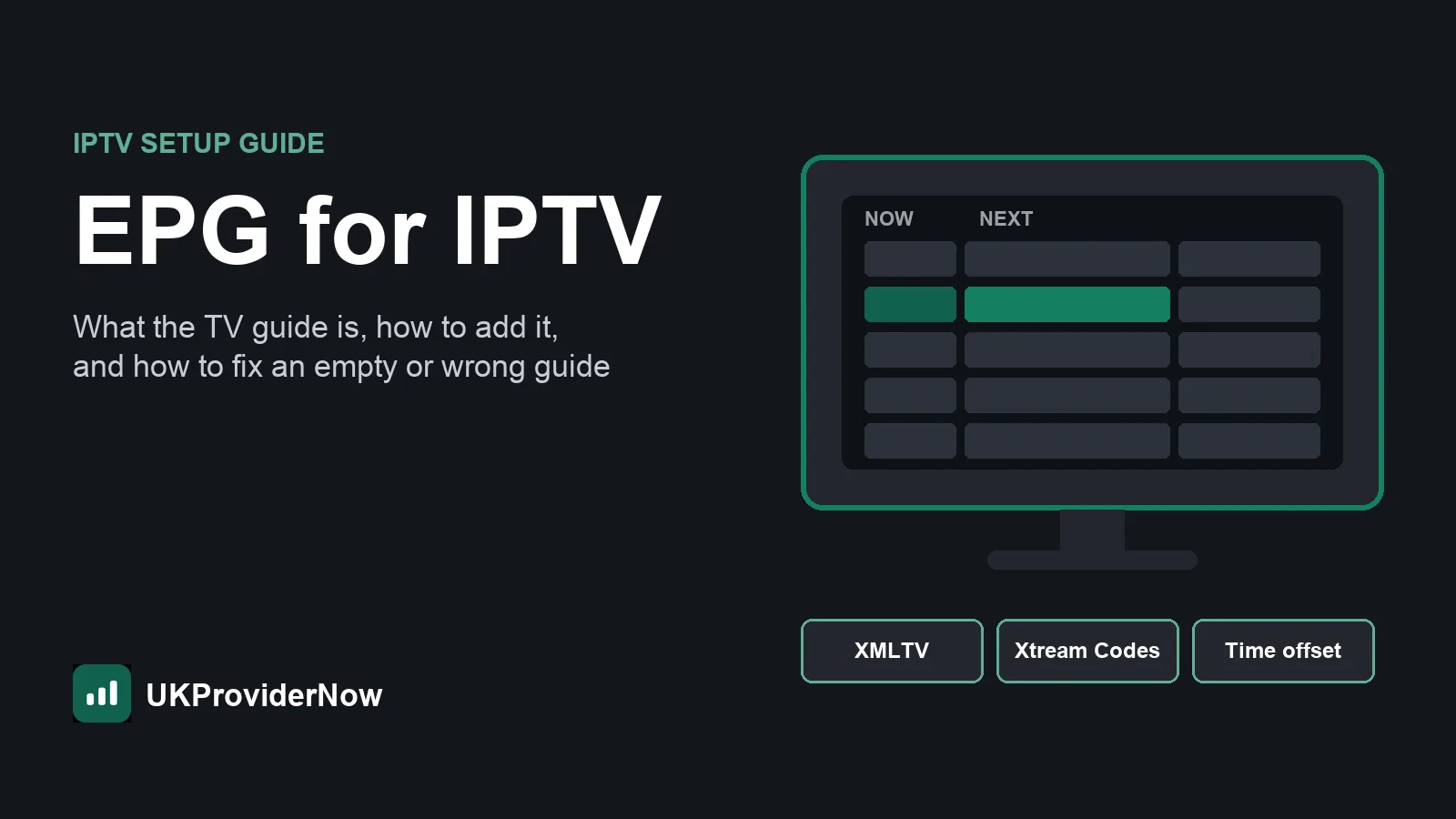
The TV guide is empty or an hour out. With an M3U playlist, add the EPG link on the app's website. If times are wrong, change the time offset in the app's settings. Our guide to EPG for IPTV explains both, and the EPG validator checks your guide link.
Buffering on the Samsung but not on other devices. Samsung TVs often have a weaker Wi-Fi chip than a modern stick. Use an Ethernet cable if you can, close other apps, and run our IPTV speed test on the TV's network at the time you watch. Allow about 10 Mbps per Full HD screen. The IPTV buffering test shows whether the cause is your line, the TV or the service.
The app stopped working after a TV update. Uninstall and reinstall the app, then check the MAC address on the website again. Your activation is tied to the device, so it normally survives a reinstall.
Still stuck? Our Help Center has fixes for each of these, or our TV setup help team can set your Samsung up remotely.
Using UKProviderNow on a Samsung TV
Every app in this guide works with UKProviderNow. You get a single Xtream Codes login that loads 34,000+ live channels in SD to 4K, a full TV guide and 195,000+ movies and series into IBO Player or Hot Player in one go.
- Built-in VPN and anti-block on our servers, so there is nothing to install on your TV (Samsung TVs cannot run VPN apps anyway).
- Prepaid plans with no automatic renewal, and a 30 day money back guarantee on every subscription.
- Setup help: step by step guides in our Help Center, WhatsApp support, and remote TV setup help if you would rather someone did it for you.
Test it on your Samsung first: request a free IPTV trial with no card needed, load it into the app's free trial, and only pay for either once you are happy. Then compare IPTV subscription plans.
Best IPTV app for Samsung TV: FAQs
What is the best IPTV app for Samsung Smart TV?
IBO Player for most people, because it supports Xtream Codes with a full TV guide, has a free trial and runs on every other device in the house too. Hot Player is the best alternative, especially if you want a longer free trial.
Is there a free IPTV app for Samsung TV?
Most Samsung IPTV apps are free to download and free to use during a trial, then need a small one off activation per TV. Flix IPTV is free to download; check its site for current terms.
Can I install TiviMate on a Samsung TV?
No. TiviMate is Android only and Samsung TVs run Tizen. Plug a Fire TV Stick or Google TV streamer into your Samsung to use TiviMate.
Can I install IPTV Smarters on a Samsung TV?
Sometimes. Smart TV versions of IPTV Smarters have come and gone from the Samsung store, so it depends on your country and model. IBO Player and Hot Player are the more reliable choices.
Why can't I find an IPTV app in the Samsung app store?
Samsung store listings vary by country and by TV model year, and apps are sometimes removed. Check your model with our Smart TV IPTV checker and try one of the other apps in this guide.
Do I need to pay for activation on every Samsung TV?
Yes, activation is usually per device, so each TV needs its own. Your IPTV subscription is separate and can be used on several TVs, as long as your plan has enough connections for the screens watching at once.
Do I need a VPN for IPTV on a Samsung TV?
Samsung TVs cannot run VPN apps. With UKProviderNow you do not need one, because VPN protection and anti-block are built into our servers.
Does IPTV work on older Samsung TVs?
Samsung TVs from roughly 2015 onwards run Tizen and can install IPTV apps if they are listed for your model. On older or slow Samsung TVs, a streaming stick is usually the better option.
Useful next steps
- IPTV apps and playersEvery player we support, compared.
- IPTV Smarters Pro guideSetup, features and tips for IPTV Smarters Pro.
- OTT Navigator guideSetup, features and tips for OTT Navigator.
- IBO Player guideSetup, features and tips for IBO Player.
- Player Compatibility CheckerThe best IPTV app for your device.
- Help CenterSetup guides and fixes for common problems.
Published by UKProviderNow, a UK IPTV provider. About us · Contact us · Help Center
Questions and comments